

Modern buyers want proof. Enterprise security teams no longer accept generic assurances – they want to know how a vendor identifies issues, who drives them to resolution and whether fixes are fully verified. In regulated industries such as healthcare and finance, those questions are more than procurement formalities; they determine whether data remains protected and whether fines or breach costs become a reality. Over the past year the global average cost of a data breach jumped to USD 4.88 million, a 10% spike from the year before, while more than one in three breaches originated from third‑party compromises. Buyers see those headlines and demand control evidence before signing contracts.
This article, written from the perspective of a practitioner who has led thousands of audits, explores SOC 2 Ticketing Workflows For SOC 2 in depth. Ticketing workflows are not an explicit SOC 2 requirement, but they are how leading organisations operationalise trust services criteria. The guide explains what auditors look for, how mature ticketing processes support repeatable compliance and how templates make daily operations audit‑ready. Throughout the article you will see how strong ticket practices shorten sales cycles and avoid the painful remediation loops that derail audits. We’ll use concrete data, controls mapping and lessons from over 6,000 security audits and 25 years of combined experience to help you build a program that stands up to auditors, regulators and buyers. This guide emphasises SOC 2 Ticketing Workflows For SOC 2 as the foundation for managing operational evidence and accelerating enterprise deals.
Why Enterprise Buyers Care About How Issues Are Logged and Closed
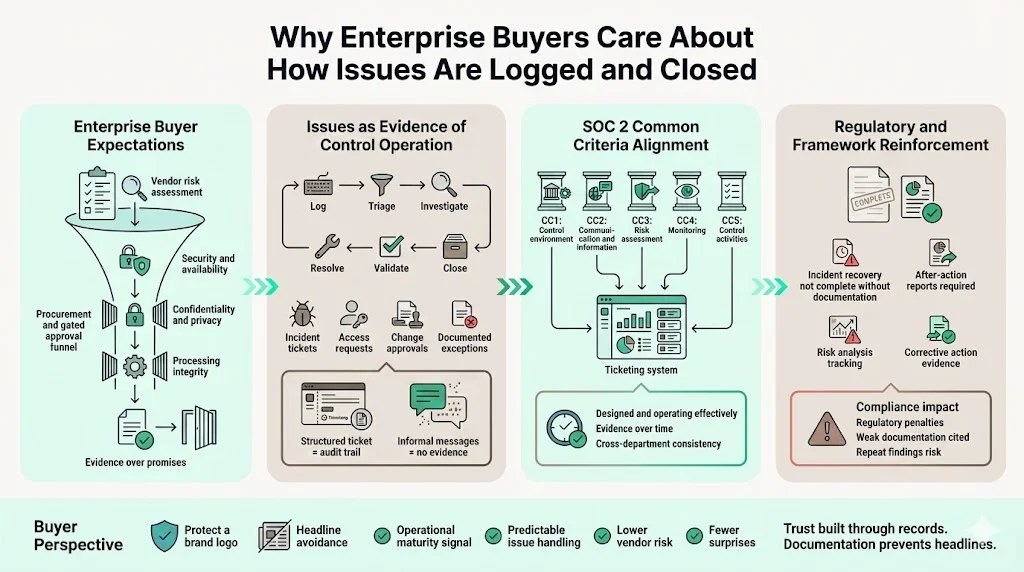
Enterprise procurement has become a stringent risk assessment process. Companies purchasing software or services must document that their vendors meet control expectations across security, availability, confidentiality, processing integrity and privacy. The trust services criteria developed by the AICPA present a unified set of common criteria that apply to all five categories and category‑specific criteria for availability, processing integrity, confidentiality and privacy. Service organisations demonstrate these controls not through promises but through records – incident tickets, access requests, change approvals and documented exceptions.
Security buyers scrutinise these records because they provide insight into a vendor’s operational maturity. A structured ticket shows that an incident was logged, triaged, investigated, resolved and validated, while an ad hoc Slack message leaves no audit trail. In the context of SOC 2, auditors verify that controls are designed and operating effectively over a period. For example, the control environment (CC1 series), communication and information (CC2 series), risk assessment (CC3 series), monitoring of controls (CC4 series) and control activities (CC5 series) are part of the common criteria. Each area requires evidence: risk assessments documented, controls monitored, and corrective actions tracked. Ticketing systems provide that evidence consistently across departments.
In addition to SOC 2, other frameworks reinforce the need for well‑documented issue handling. NIST’s 2025 incident response guidance states that the end of incident recovery is declared only when incident‑related documentation is completed and an after‑action report is prepared. HIPAA enforcement actions also emphasise the cost of weak documentation; the Office for Civil Rights can impose penalties up to $71,162 per violation with annual caps up to $2,134,831. These penalties often stem from failures to conduct risk analyses, monitor system activity or document corrective actions, all of which are best captured through structured ticketing. Enterprise buyers want to know that their vendors won’t be the next headline.
How Ticketing Workflows Fit Into SOC 2 Trust Criteria
SOC 2 examinations evaluate whether a service organisation’s controls are suitably designed and operating effectively to meet specified trust services categories – security, availability, processing integrity, confidentiality and privacy. For the security category, controls must protect information and systems against unauthorised access and damage. Availability requires that systems are accessible for operation and use to meet objectives. Processing integrity ensures system processing is complete, valid, accurate, timely and authorised. Confidentiality focuses on protecting designated confidential information, while privacy governs how personal information is collected, used and disposed.
Ticketing workflows are not called out explicitly in the SOC 2 description criteria, yet they are how organisations demonstrate that controls operate consistently. For example, one of the common criteria (CC2.1) requires that control responsibilities are communicated and assigned. When an incident ticket includes an assignee, due date and escalation path, it shows that responsibility has been communicated and accepted. CC3.2 expects risk assessments to be conducted and documented – a risk review ticket with comments and approvals provides that evidence. The specific criteria for availability (A series) include the need for change management and incident response processes; a ticket tracking system outage or failed job maps directly to those criteria. In short, SOC 2 Ticketing Workflows For SOC 2 translate broad criteria into daily actions that are traceable and auditable.
What Auditors Look For in Ticket Evidence
Auditors examine whether ticket workflows demonstrate control effectiveness rather than merely checking that a ticket exists. They look for ownership and role assignments, timestamps marking when issues were detected, triaged, escalated, resolved and closed, attachments such as logs, screenshots and approvals, and linkages to related incidents or changes. Inconsistent classifications or missing resolution details signal weak controls, whereas a clear pattern of intake, investigation, resolution and validation across tickets demonstrates that the control environment operates consistently.
From Ad Hoc Issue Handling to Structured Ticketing
Informal tracking via chat or spreadsheets may work for small teams but collapses under audit. Without a ticket system, evidence is scattered across messages and emails, making it hard to prove how incidents were handled. Structured ticketing enforces consistent data capture through required fields for description, impact, severity, owner, timeline and remediation. Approvals become part of the ticket rather than separate emails, attachments are stored centrally and workflows trigger escalation when deadlines are missed. Our audits show that organisations with mature ticketing experience 50–70% fewer auditor follow‑ups and shorter audit timelines. Integrated systems provide audit trails, link issues to remediation and summarise metrics such as mean time to resolution, reducing friction during audits.
Why Enterprise Buyers Expect Mature Ticketing Workflows
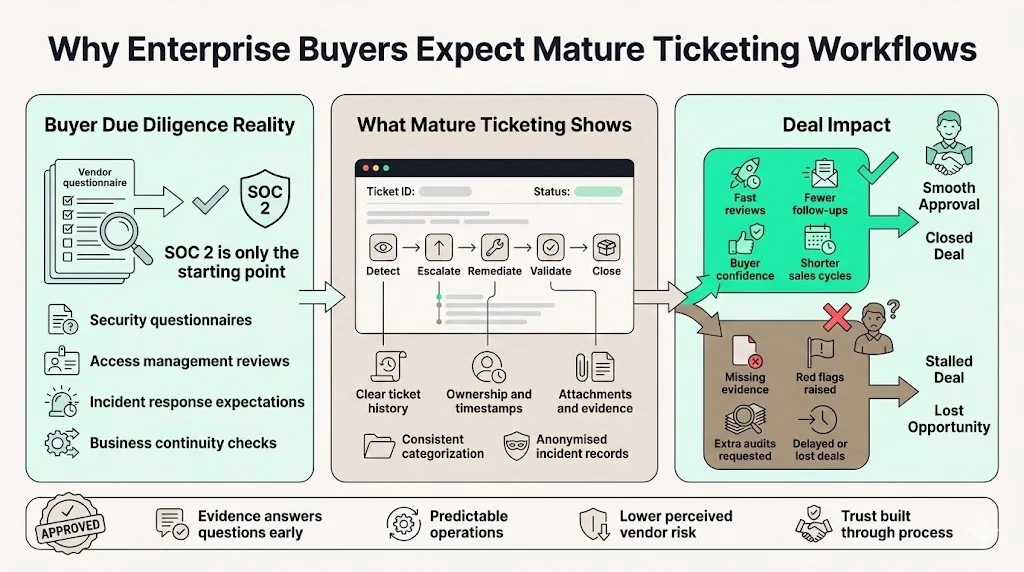
During vendor due diligence, buyers review more than a SOC 2 report. They often issue detailed questionnaires covering secure development, access management, incident response and business continuity. A mature ticketing workflow answers these questions proactively. Structured tickets with clear history and attachments demonstrate operational maturity, anonymised incident tickets show timely detection, escalation and remediation, and the absence of evidence for access reviews or change approvals raises red flags that slow or derail deals.
Core Ticket Types Required for SOC 2
Based on the trust services criteria and thousands of audits, a SOC 2‑ready organisation uses four ticket categories: incidents, operational exceptions, service requests and compliance tasks. Incident tickets record when a security or availability event is detected, who reported it, the severity, the affected systems, the root cause, corrective actions and lessons learned. They should link to the remediation ticket and include evidence such as monitoring alerts, logs or vendor root‑cause reports. Operational exception tickets cover outages, failed jobs and access errors; they capture the affected system, observed symptoms, assigned owner, resolution steps and verification. Service request tickets document access or configuration changes, including the requester, business purpose, approver, provisioning details and closure verification; attach user lists and approvals to prove least‑privilege enforcement. Compliance tickets track policy updates, risk reviews and control testing. They record the policy name, change description, approver, effective date and risk treatment plan, providing evidence that periodic assessments occur.
Ticket Categorisation, Severity and Prioritisation
Clear severity categories guide triage and response. A typical scheme defines four tiers: critical issues such as complete outages or confirmed data compromise require immediate action; high severity demands response within hours; medium severity may be addressed over days; and low severity covers minor bugs and documentation updates. Document these definitions and incorporate them into ticket templates so auditors see consistent use. Prioritisation is not limited to severity; it should also consider trust‑criteria impact, customer effect and regulatory deadlines (for example, GDPR’s 72‑hour breach notification and HIPAA’s similar obligations). Document these rules so the ticketing system can enforce consistent handling and escalation when service agreements (SLAs) are at risk.
Designing SOC 2‑Ready Ticketing Workflows
Effective SOC 2 Ticketing Workflows For SOC 2 define stages that mirror an incident’s life cycle and make control operation visible. Intake and classification collect required metadata and assign an owner with a due date. Investigation and action focus on root‑cause analysis and remediation steps while capturing relevant evidence in concise comments or linked documents. Resolution and validation verify that fixes work and include testing results, peer review or change approval. Closure records lessons learned and after‑action reports. The ticketing system should log status transitions and timestamps so auditors can trace progress. Automation can route approvals, send reminders and attach artefacts from code repositories or monitoring systems, but critical decisions should always involve human review. Escalation rules should ensure that severe incidents immediately involve leadership while avoiding alert fatigue; overdue access requests or compliance tasks should trigger reminders. Document these rules so the system enforces them consistently.
Documentation and Evidence Expectations
Auditors do not expect encyclopaedic detail, but they need clear proof that issues were managed. Provide concise evidence such as screenshots, log snippets and plain‑language comments with timestamps. Summarise conversations rather than copying chat threads, and include root cause and validation details. Avoid both under‑documentation (no root cause or validation) and over‑documentation (excess chat logs).
Ticket Retention and Audit Timelines
Retain tickets for at least the SOC 2 Type II observation period plus a buffer so that auditors can test control effectiveness. Retention policies should coordinate with other frameworks—HIPAA requires six years for policies and procedures, while GDPR mandates data minimisation. Tickets containing personal information should be anonymised or purged when no longer needed. Automate retention schedules and coordinate them with audit windows to prevent manual errors.
Structured ticketing closes security issues and builds the audit trail automatically.
Drop your work email and design workflows that satisfy both your team and your auditors.
Templates: SOC 2 Ticketing Workflows
Standard templates increase consistency but must remain flexible. An incident template should capture the category, concise description, impacted systems, severity, detection method, owner, root cause, corrective actions, validation evidence, lessons learned and links to related tickets. An access request template should include the requester, business purpose, resource, specific privileges requested, approver, approval evidence, provisioning steps, closure validation and links to periodic access reviews. A compliance task template should record the task name, scope, relevant control mapping, reviewer, due date, attached evidence, review cycle and status. Review templates periodically based on auditor feedback and adapt them for special cases such as privacy incidents or supply chain issues.
Common Mistakes That Trigger Audit Follow‑Ups
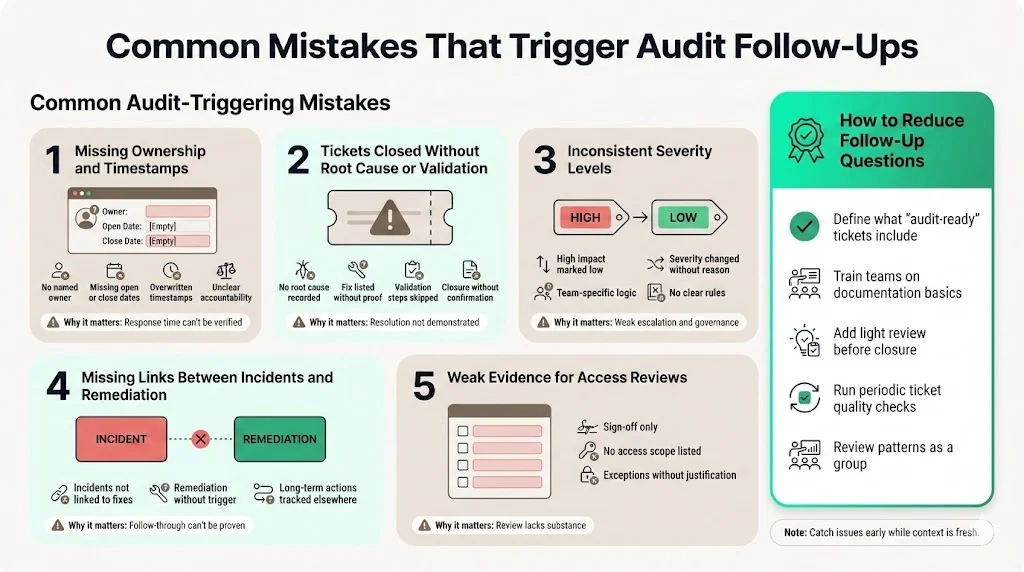
Based on insights from more than 6,000 security audits, certain patterns show up again and again. These gaps tend to slow audits down and invite extra questions from auditors. Most are avoidable with tighter habits and routine checks.
1) Missing Ownership and Timestamps
Auditors expect every ticket to show who owned it and when actions took place. When this is unclear, they question accountability and response timelines.
-
Tickets without a named owner or resolver
-
Missing open, update, or closure timestamps
-
Manual edits that overwrite original dates
Why it matters: Auditors use timestamps to confirm response speed and escalation paths. Gaps weaken that trail.
2) Tickets Closed Without Root Cause or Validation
Closing a ticket without explaining what went wrong and how it was fixed raises red flags.
-
No documented root cause analysis
-
Fixes listed without proof they worked
-
Validation steps skipped or vaguely described
Why it matters: Auditors want proof the issue was understood and actually resolved, not just closed.
3) Inconsistent Use of Severity Levels
Severity ratings should follow clear rules. When similar incidents receive different ratings, auditors question judgment and controls.
-
High-impact incidents marked as low severity
-
Severity changed without explanation
-
Teams applying their own severity logic
Why it matters: Severity drives response time, escalation, and reporting. Inconsistency suggests weak governance.
4) Missing Links Between Incidents and Remediation
Incidents rarely stand alone. Auditors expect to see how issues led to corrective actions.
-
Incident tickets not linked to remediation tasks
-
Remediation records without a triggering incident
-
Long-term fixes tracked outside the system
Why it matters: Auditors look for a clear chain from issue to fix. Broken links suggest incomplete follow-through.
5) Weak Evidence for Access Reviews
Access reviews are often completed but poorly documented.
-
Review sign-offs without supporting details
-
No record of what access was reviewed
-
Exceptions approved without justification
Why it matters: Auditors need evidence, not just confirmation that a review happened.
6) How to Reduce Follow-Up Questions
These issues tend to shrink when teams apply consistent discipline.
-
Train teams on what “audit-ready” tickets look like
-
Add basic oversight before tickets are closed
-
Run periodic quality checks on closed records
-
Review tickets as a group to spot patterns early
Regular reviews help teams catch missing details while the context is still fresh. Over time, this builds cleaner records and smoother audits.
How Ticketing Workflows Support Faster Enterprise Sales
Sales cycles for enterprise and healthcare customers often stall when vendors can’t provide satisfactory evidence of operational controls. Mature SOC 2 Ticketing Workflows For SOC 2 turn security artifacts into sales enablement assets. During procurement, sharing anonymised incidents, access and compliance tickets reduces back‑and‑forth and shows that processes operate. Detailed tickets demonstrate operational maturity by documenting investigations, root causes and validations, and metrics such as mean time to detection or resolution can be drawn directly from the ticketing system to reassure buyers. Transparent handling of issues builds trust and accelerates negotiations.
Cross‑Framework Applicability and Real‑World Implementation
Ticketing processes built for SOC 2 often translate directly to other frameworks. Under ISO 27001:2022 an Information Security Management System requires documented risk assessments, control objectives and a Statement of Applicability. Tickets tracking risk evaluations, control testing and corrective actions provide the evidence needed for surveillance audits and Annex A controls. HIPAA mandates administrative, physical and technical safeguards for electronic protected health information (ePHI); tickets documenting access requests, audit log reviews, encryption changes and breach notifications satisfy those requirements and support Business Associate Agreements. GDPR requires data minimisation, purpose limitation, records of processing and Data Protection Impact Assessments. Tickets recording how personal data is collected, used and disposed, approvals for cross‑border transfers and risk reviews help show compliance. Mature SOC 2 Ticketing Workflows For SOC 2 can thus be leveraged across ISO, HIPAA and GDPR audits without duplicating effort.
Over 6,000 security audits have taught us that disciplined SOC 2 Ticketing Workflows For SOC 2 shorten readiness timelines and reduce internal workload. A self‑managed SOC 2 programme can take nine to twelve months and consume hundreds of hours of engineering and security time. By contrast, a managed service with a dedicated CISO and integrated ticketing can achieve readiness in four to five months and reduce annual effort to around seventy‑five hours. Ticket data feeds continuous monitoring, monthly access reviews and quarterly risk assessments, turning evidence collection from a scramble into a routine. These practices not only support compliance but also improve operational resilience. During enterprise procurement, cross‑framework ticket history shows buyers that controls are built into daily work rather than bolted on for audits, accelerating deals and avoiding months of back‑and‑forth. In regulated healthcare or finance sectors, this operational maturity is often the difference between winning and losing business. Because the same tickets map to SOC 2, ISO 27001, HIPAA and GDPR requirements, investments in SOC 2 Ticketing Workflows For SOC 2 pay dividends across all regulatory obligations.
Make your ticket queue the audit trail
Book a demo and we'll show how Konfirmity links your change, incident and access tickets to the controls they evidence, with owners, timestamps and closure notes already attached.
Book a demo
Conclusion
The days of relying on paper policies and scattered chat logs are over. Customers, auditors and regulators expect evidence that controls operate daily, not just when auditors visit. Ticketing workflows turn abstract criteria into actionable, repeatable processes that meet SOC 2, ISO 27001, HIPAA and GDPR expectations. The AICPA’s trust services criteria provide the framework for security, availability, processing integrity, confidentiality and privacy, while NIST reminds us that incident recovery isn’t complete until documentation and after‑action reports are prepared. Data breach statistics underline the stakes – the average cost surged to $4.88 million in 2024 and more than 35% of breaches now originate from third parties. HIPAA penalties demonstrate that inadequate documentation can lead to millions in fines.
Disciplined SOC 2 Ticketing Workflows For SOC 2 reduce audit stress and sales risk. They show buyers that security is embedded in daily operations, not bolted on for compliance. They provide auditors with the evidence they need to issue clean opinions. And they free engineering and security teams to focus on improving products rather than scrambling for audit artefacts. The next step for teams preparing for enterprise scrutiny is to map existing processes to ticket templates, train staff on severity and escalation rules, automate evidence capture where it helps and regularly review tickets for completeness. A human‑led, managed security program, combined with strong ticketing, starts with real security and arrives at compliance.
Implementing ticketing is about building habits that protect data, satisfy auditors and win customer trust. With strong ticketing built into daily work, compliance becomes routine instead of an annual scramble. That mindset shift separates high‑performing teams from those always catching up. Start today to avoid last‑minute rush and build lasting operational resilience and growth.
Frequently Asked Questions
The SOC 2 standard does not mandate specific tools, but auditors expect evidence that controls are designed and operating effectively. ComplyJet explains that auditors look for traceable activity like approvals, logs and tickets. While not required, SOC 2 Ticketing Workflows For SOC 2 provide the structured evidence that auditors and enterprise buyers expect. A ticketing system provides a consistent way to capture that evidence, making audits smoother. Without a ticketing system, you’ll need to assemble equivalent proof manually.
At minimum, track security incidents, operational exceptions, service requests (particularly access requests) and compliance tasks. Each maps to specific trust services criteria and control objectives. Incident tickets demonstrate your ability to respond and recover; service request tickets show you enforce least privilege; compliance tickets evidence policy updates and risk reviews.
Evidence should be sufficient to demonstrate that controls operated as intended. Include owners, timestamps, severity, actions taken and validation results. Attach logs or screenshots where they provide proof. Avoid pasting entire chat threads; summarise important actions and reference external documentation. NIST guidance advises preparing after‑action reports documenting the incident, response and recovery actions.
Yes. Automated routing, reminders and evidence capture can reduce human error and improve consistency. However, automation should not replace human judgment. For example, automated ticket closure without validation can lead to unresolved issues. Use automation to enforce required fields, capture approvals and monitor SLAs, while ensuring that humans review and validate critical steps.
Retain tickets for at least the length of the SOC 2 Type II observation period plus a buffer (e.g., six months). Coordinate retention with other frameworks: HIPAA requires six years for policies and procedures, while GDPR demands data minimisation. Automate retention and consider anonymising or purging personal data once retention periods expire.







