Most enterprise buyers now require solid proof of security before they sign a contract. A polished policy is not enough; auditors and procurement teams want to see how a company actually responds to threats, fixes weaknesses and documents its actions. ISO 27001 Ticketing Workflows For ISO 27001 is a mouthful, but it captures the intersection of process discipline and evidence that enterprise customers expect. This article explains what ticketing workflows mean in a security context, why they matter for ISO 27001 certification and buyer due‑diligence, and how to design and run them. It draws on current research, regulation and first‑hand experience from Konfirmity’s 6 000+ security audits and 25 years of combined expertise. Throughout this article, we will examine how ISO 27001 Ticketing Workflows For ISO 27001 help organisations maintain compliance and accelerate enterprise sales.
ISO 27001 and Ticketing Workflows: The Basics
What ISO 27001 Actually Is
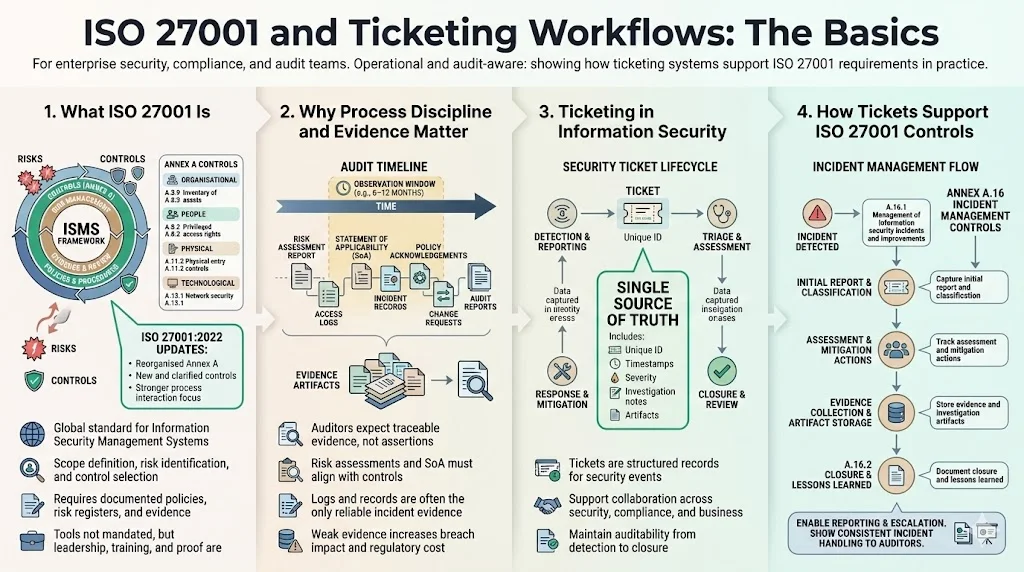
ISO 27001 is the globally recognised framework for building and operating an Information Security Management System (ISMS). The latest revision, ISO 27001:2022, reorganised Annex A controls, introduced 11 new controls and clarified process‑interaction requirements. Organisations had until 31 October 2025 to transition; certificates based on the 2013 edition expire after that date. An ISMS sets the scope, identifies risks, selects appropriate controls and monitors that those controls operate. It requires documented information such as policies, risk registers and evidence records. The standard does not prescribe specific tools but insists that management provide leadership, staff receive training, and evidence is collected during an observation window. Under the 2024 amendment, organisations must also consider environmental changes and extreme weather in their context.
Why process discipline and evidence tracking matter
Auditors and buyers no longer accept superficial compliance. They scrutinise risk assessments, statements of applicability and traceable evidence of control operation. The cost of failure is rising: IBM’s 2025 Cost of a Data Breach report found that the global average cost of a breach is USD 4.4 million, while one industry analysis reports that the average U.S. breach now exceeds USD 10.22 million. Non‑compliance with regulations can add roughly USD 174 000 to each incident. Without solid evidence, companies struggle to detect incidents quickly, fix root causes and show regulators what happened. AuditBoard notes that logs are essential evidence: they are often the only reliable records when investigating an incident, and a lack of logs can create blind spots and drive up costs. For the ISMS to pass an audit, organisations need to show that they record, retain and review evidence over an observation window, usually 6–12 months.
Ticketing within information security
Security tickets are the building blocks for disciplined incident response and issue tracking. Deepwatch describes a security incident ticket as a structured record used by security teams to document, track and manage the lifecycle of a suspected or confirmed cyber event. Each ticket includes a unique identifier, timestamps, severity classification and a narrative of what was detected. Tickets serve as a single source of truth for investigation activities, evidence collection and response actions. They connect technical, compliance and business stakeholders and maintain auditability throughout the response process. Incident management controls in ISO 27001 (Annex A.16) require a consistent and effective approach to the lifecycle of incidents, events and weaknesses. Tickets operationalise that requirement: they capture the initial report, classification, assessment, mitigation, evidence collection and closure. A ticket system also supports reporting and escalation by ensuring staff know where to log incidents and by keeping management informed.
Why Ticketing Workflows Are Essential for ISO 27001
Bridge between theory and practice
ISO 27001 defines outcomes such as incident response, risk management and audit readiness but does not specify how to achieve them. ISO 27001 Ticketing Workflows For ISO 27001 fills that gap. Ticketing workflows translate abstract requirements into repeatable steps: when a risk is identified, a ticket is opened; when an incident occurs, it is classified, triaged, contained and resolved through defined status transitions. This chain of records demonstrates to auditors that controls operate as described in policies and that issues are not forgotten.
Support for critical controls and processes
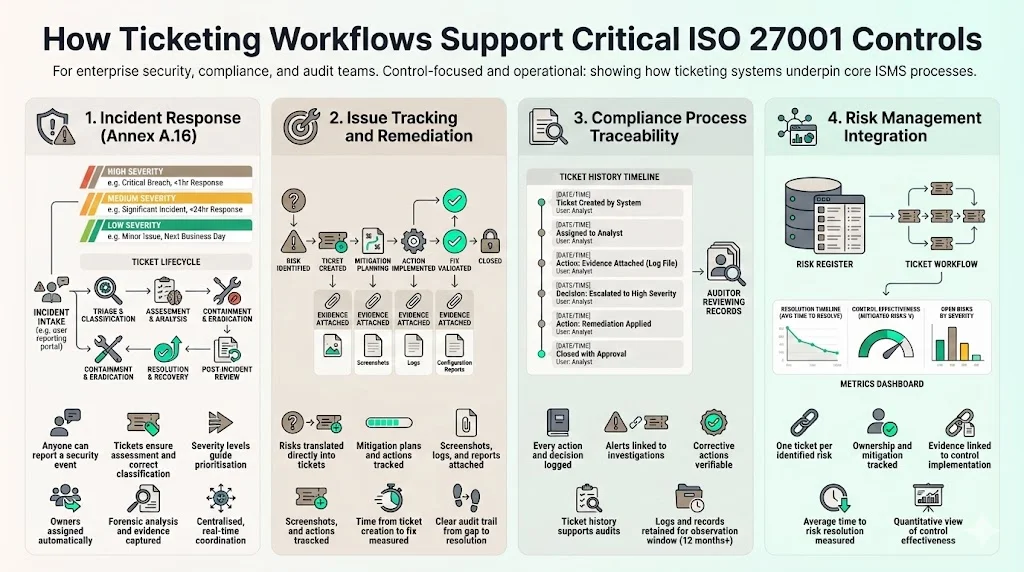
Incident response – Annex A.16.1 requires a consistent approach to incidents. A well‑designed ticketing system allows anyone to report an event, ensures that it is assessed and classified correctly, assigns owners, documents forensic analysis and collects evidence. Copla emphasises that integrating an automated ticketing system with incident reporting ensures real‑time coordination and centralised monitoring. Severity classification models—High, Medium, Low—help teams prioritise resources and meet service commitments.
Issue tracking and remediation – The ISMS requires corrective actions for identified risks. Linking risk assessments directly to tickets creates an audit trail from risk identification to mitigation planning and implementation. NinjaOne suggests attaching evidence such as screenshots, logs or reports to each ticket and tracking the time from risk ticket creation to control implementation. This makes it easier to show auditors how quickly an organisation addresses gaps and to measure mean time to risk reduction.
Compliance process traceability – Deepwatch emphasises that security tickets support audit and compliance requirements for frameworks such as ISO 27001. Tickets log every action, attachment and decision, so auditors can verify that alerts were investigated and corrective actions applied. AuditBoard points out that retaining at least 12 months of logs is recommended for ISO 27001 compliance.
Risk management integration – ISO 27001:2022 stresses that control selection must be based on risk assessment. By raising a ticket for each risk, organisations can track the assessment, assign ownership, plan mitigation and record evidence of how the risk is addressed. Measuring the average time from risk detection to resolution provides a quantitative indicator of control effectiveness. This integration underscores the importance of ISO 27001 Ticketing Workflows For ISO 27001 in linking risk and control implementation.
Value for enterprise buyers
Enterprise procurement teams are increasingly security‑savvy. They request evidence of control operation, observation‑window coverage and remediation tracking. ISO 27001 Ticketing Workflows For ISO 27001 makes it easier to provide this proof. Security tickets feed dashboards with metrics such as incident volume, response time and threat categories. They enable cross‑team coordination across security, operations, legal and leadership, giving buyers confidence that the vendor can manage incidents. Because each ticket shows timestamps, actions and outcomes, a vendor can answer due‑diligence questionnaires quickly, shortening sales cycles.
Designing ISO 27001 Ticketing Workflows
Konfirmity has implemented hundreds of ticketing workflows across regulated industries. Designing ISO 27001 Ticketing Workflows For ISO 27001 requires careful attention to how information flows through your organisation. The following design elements come from that experience and from lessons learned during 6 000+ security audits.
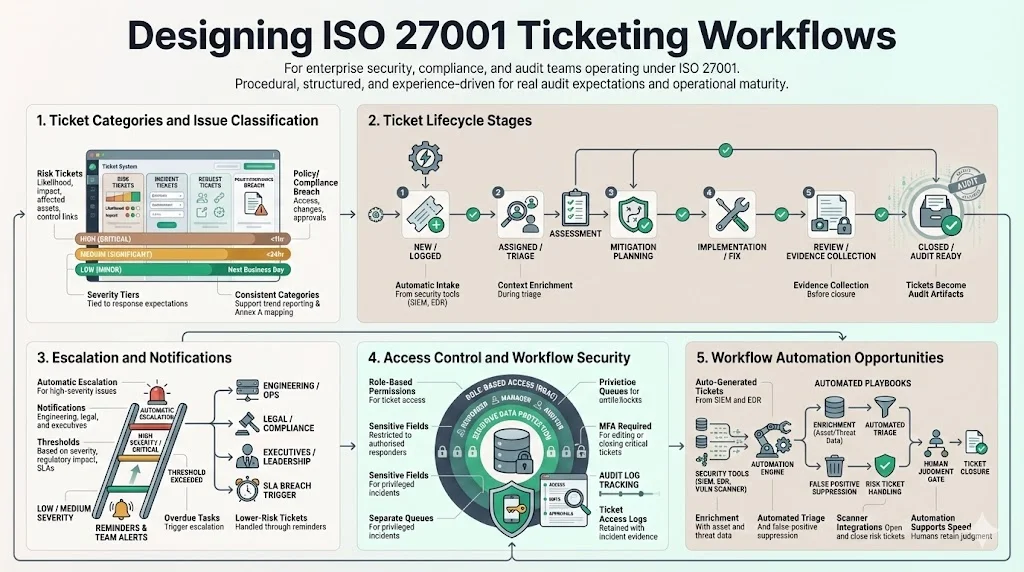
1) Ticket categories and issue classification
Grouping tickets by purpose improves prioritisation and reporting. Typical categories include:
- Risk tickets – created when a risk assessment identifies a new threat or vulnerability. Fields capture the risk description, likelihood, impact, affected assets, and links to applicable controls.
- Incident tickets – opened for security events such as phishing attempts, unauthorised access or malware infections. They record detection source, severity, impact, containment steps and root‑cause analysis.
- Request tickets – used for routine tasks like access provisioning, configuration changes or exception approvals. Tracking requests ensures separation of duties and that approvals are documented.
- Policy or compliance breach tickets – raised when internal policy violations are detected, such as missing training or misconfigured encryption.
Classification matters because it ties response expectations to severity. Copla proposes a three‑tier model (High, Medium, Low) that maps incident types to prescribed actions and service agreements. For example, a ransomware attack falls into the high tier, requiring immediate isolation and investigation, while a blocked phishing email might be logged at the low tier and reviewed during periodic analysis. Using consistent categories makes it easier to report incident trends to management and to map tickets to Annex A controls.
2) Ticket life cycle stages
Each ticket should progress through defined stages that mirror the incident lifecycle. Below is a typical sequence:
- New / Logged – The issue is detected or reported. Critical details such as detection source, timestamp, affected systems and initial severity are captured. Automatic creation from SIEM/EDR alerts reduces manual entry.
- Assigned / Triage – An owner is assigned. The responsible analyst reviews the ticket, validates the event and gathers context such as asset criticality, user identity and threat intelligence.
- Assessment – The analyst determines the impact, urgency and scope. This includes identifying data involved, estimating business impact and classifying severity according to internal matrices. For risk tickets, this stage includes assessing likelihood and selecting controls.
- Mitigation Planning – Actions are defined. For incidents, this might mean containment steps and forensic analysis; for risk tickets, it involves choosing controls and planning remediation tasks. Stakeholders such as legal or privacy officers are engaged if required.
- Implementation / Fix – The plan is executed. Systems are patched, credentials revoked, firewall rules updated or policies revised. For risk tickets, controls are implemented and verified.
- Review / Evidence Collection – The responsible team collects evidence of the fix and verifies that the issue is resolved. This includes logs, configuration screenshots, approval records and test results. AuditBoard stresses that logs should be retained for at least 12 months to support this stage.
- Closed / Audit Ready – The ticket is closed only after documentation is complete and an internal review confirms the resolution. The ticket becomes part of the audit record and should be available during surveillance or recertification audits.
3) Escalation and notifications
Escalation rules ensure that serious incidents receive appropriate attention. Industry guidance notes that incident responders must notify top management, inform regulators if necessary and rectify the underlying weakness. When severity is high, the ticket system should automatically alert senior engineers, legal counsel and executives. Notifications can be delivered via email, messaging apps or ticket dashboards. Define clear thresholds for escalation based on severity, regulatory impact (e.g. personal data breach) and contractual obligations (e.g. SLA breaches). For lower‑tier tickets, automated reminders suffice but overdue tasks should trigger escalations.
4) Access control and security in your workflow
Tickets often contain sensitive data—personally identifiable information, vulnerability details or credentials. Access to create, view or modify tickets must follow the organisation’s access control policy (Annex A.9). Use role‑based permissions to restrict sensitive fields to authorised responders. Implement separate queues for privileged tickets and require multi‑factor authentication for editing or closing incidents. Audit logs of ticket access should be retained alongside incident evidence, allowing auditors to verify that only authorised personnel handled sensitive cases. emphasises that proper log retention is critical when investigating incidents.
5) Workflow automation opportunities
Automation reduces human error and speeds up response. Deepwatch describes how incident tickets can be auto-generated from SIEM or EDR alerts, enriched with asset information and threat intelligence, and moved through stages using playbooks. Automated triage rules suppress false positives, correlate related alerts and assign severity. Notifications and reminders can be scheduled for overdue assessments, risk reviews or evidence collection. For risk tickets, integration with vulnerability scanners can automatically open tickets when new findings are detected and close them once patches are applied. Workflow automation should complement, not replace, expert judgment—human oversight remains essential for root‑cause analysis and nuanced decisions.
Integrating Ticketing With ISO 27001 Core Processes
Incident response
Annex A.16 defines controls for incident management, including responsibilities, reporting, assessment, response and learning. Tickets operationalise these controls:
- Reporting and classification – Staff report events through the ticketing system. A clear process ensures they understand what constitutes an incident, event or weakness.
- Assessment and containment – Incidents are assessed to decide if they meet criteria for escalation. The responder collects forensic evidence, identifies root causes and isolates affected systems.
- Learning and improvement – After closure, lessons learned are captured and used to improve policies and controls. Published guidance stresses that incident analysis results must feed back into the ISMS to prevent recurrence.
Mapping the incident response plan to ticket stages ensures that each control requirement is met and that auditors can trace the process end‑to‑end.
Risk management
ISO 27001:2022 reinforces a risk‑based approach. Clause 6.1.3 clarifies that Annex A is a list of possible controls; organisations must select controls based on their risk assessments. In practice, each identified risk should create a ticket. The ticket records the risk description, owners, impact and likelihood. During assessment, the team selects appropriate controls and records mitigation plans. Implementation tasks are tracked as subtasks of the ticket. Evidence of mitigation—patch deployment, configuration changes, training completion—must be attached. NinjaOne recommends tracking the average time from risk ticket creation to control implementation; this metric demonstrates how quickly the organisation closes gaps.
Audit trails
Auditability is a core requirement of ISO 27001 and other frameworks. Deepwatch emphasises that security tickets serve as auditable records showing that alerts were investigated and corrective actions were applied. Each ticket should contain timestamps for all actions, status changes, comments and attachments. AuditBoard points out that retaining at least 12 months of logs is recommended and that failure to produce logs can result in failed controls. For surveillance or recertification audits, the ticket history provides evidence of control operation across the observation window. Tickets should be stored in tamper‑evident systems with immutable logging and backup procedures.
Document management
Ticketing workflows intersect with document management. ISO 27001 requires organisations to control documents (clause 7.5). Keep templates and forms—incident reports, risk assessments, evidence logs—in a central repository linked to the ticketing system. Access control for these documents should match ticket permissions. When an incident occurs, the responder can select the appropriate template, fill in required fields and attach it to the ticket. During audits, auditors can review the attached documents alongside tickets. A central library reduces inconsistent formats and ensures that documents reflect the current standard and version.
Ticketing workflows are only audit evidence when they capture the right data.
Share your work email and design workflows that actually satisfy ISO 27001 auditors.
Ticketing Template Examples (Practical Assets)
Konfirmity provides ready‑to‑use templates that can be adapted to your ticketing tool. These templates help teams capture the right information without overburdening analysts. Here are three examples.
1) Incident or security ticket template
Use this template to record all details of a security incident:
| Field | Description |
|---|---|
| Ticket ID | Unique identifier with timestamp to support traceability |
| Category | Incident type (e.g., malware, phishing, unauthorised access) and severity tier |
| Detection source | System or person that detected the event (SIEM alert, user report, third-party notification) |
| Impact score | Assessment of business impact, criticality of affected assets and potential data exposure |
| Assigned owner | Name of the analyst or team responsible for managing the incident |
| Timestamps | Times for logging, triage, containment, resolution and closure to measure response metrics |
| Estimated vs. actual resolution time | Initial estimate of resolution time and the actual time taken, supporting performance monitoring |
| Evidence attachments | Logs, memory dumps, configuration screenshots, forensic reports |
2) Risk ticket template
A risk ticket should link risk assessment to mitigation:
| Field | Description |
|---|---|
| Risk description | Clear narrative of the threat, vulnerability or non-conformity identified |
| Likelihood and impact | Ratings based on the organisation’s risk matrix, used to prioritise treatment |
| Affected assets | Systems, data or processes impacted by the risk |
| Control references | Applicable ISO 27001 controls or other framework references selected to address the risk |
| Mitigation actions | Planned actions, responsible persons and due dates |
| Status | Current stage (Logged, Assessment, Mitigation, Implemented, Closed) |
| Evidence | Attach proof of risk treatment such as patch records, updated configurations or training completion certificates |
3) Compliance evidence log template
Maintaining evidence logs is critical. This template provides a structure to track evidence collected for audits:
| Field | Description |
|---|---|
| Evidence description | Type of evidence (access review, change-control record, vulnerability scan) |
| Link to artifacts | Location or attachment of the actual document, log file or screenshot |
| Owner | Person responsible for collecting and maintaining the evidence |
| Relevant controls | ISO 27001 clauses or Annex A controls that the evidence supports |
| Date collected | Date when the evidence was recorded |
| Next review date | Scheduled date for reviewing or updating the evidence |
How to Populate and Maintain These Templates
Assign ownership for each template so that someone is accountable for updates. For incident templates, the security operations team typically owns completion; for risk tickets, the risk manager or control owner is responsible. Schedule periodic reviews—monthly for incident templates, quarterly for risk tickets and evidence logs—to ensure information remains current and to reflect changes in controls or business context. Integrate templates with your ticketing tool’s data fields; most IT service management platforms allow custom forms. Automating field population (e.g. pulling asset data or user details) reduces human error and ensures completeness.
Best Practices For Running Ticketing Workflows
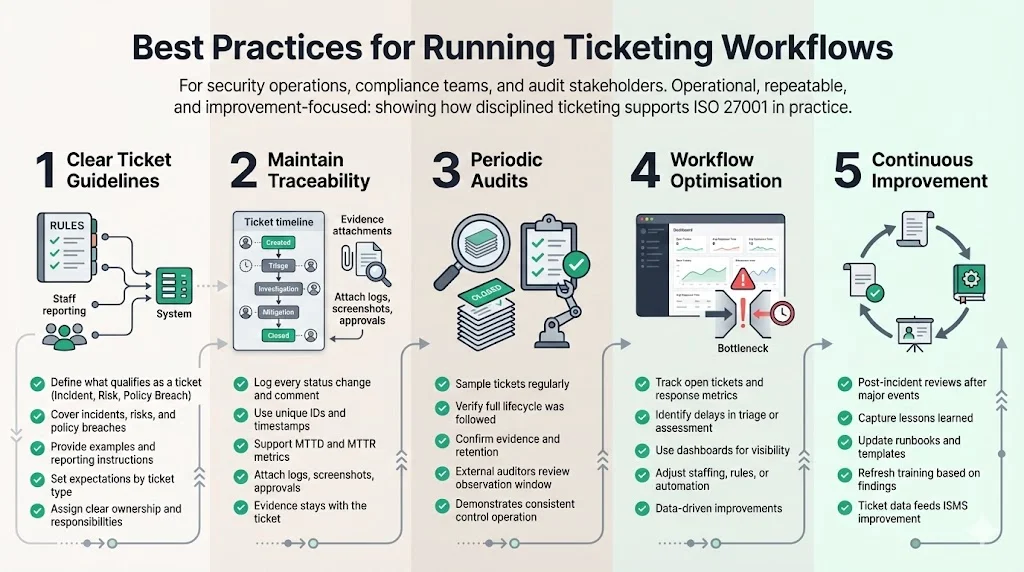
1) Clear ticket guidelines
Clear ticket guidelines are central to ISO 27001 Ticketing Workflows For ISO 27001; they ensure that every report is captured consistently. Define what constitutes a valid ticket and train staff to recognise incidents, risks and policy breaches. Provide examples and explain the reporting mechanism. Establish service expectations for each ticket category and ensure that owners understand their responsibilities.
2) Maintain traceability
Log every state change, comment and attachment. Use unique identifiers and timestamps to support metrics such as mean time to detect (MTTD) and mean time to respond (MTTR). Attach supporting documents—logs, screenshots, approval emails—directly to tickets. NinjaOne recommends integrating evidence collection into the workflow and attaching artefacts to tickets and changing records.
3) Periodic audits
Conduct internal audits of ticket histories. Sampling closed tickets allows auditors to verify that reporting, classification, assessment, mitigation and closure steps were followed. Review evidence attachments to ensure they are sufficient and that logs meet retention requirements. During an external audit, provide auditors access to ticket histories for the observation window; this demonstrates control operation and continual improvement.
4) Workflow optimisation
Monitor metrics to identify bottlenecks. Long delays between triage and assessment may indicate staffing issues or unclear responsibilities. Use dashboards to track the number of open tickets, average response times and overdue tasks. Deepwatch notes that well‑structured tickets feed operational dashboards with metrics. Use these insights to adjust staffing, refine triage rules or automate repetitive tasks.
5) Continuous improvement
After each significant incident or risk treatment, hold post‑incident reviews. Discuss what worked, what didn’t and what controls should change. Update runbooks, training materials and templates accordingly. Maintain a feedback loop between ticket data and policy updates; this is vital for an ISMS built on continual improvement.
Conclusion
Ticketing workflows are not optional extras in modern security programmes. They operationalise ISO 27001’s requirements for incident management, risk treatment, evidence collection and audit readiness. Without them, organisations risk delays in detection and response, incomplete evidence and failed audits. With them, companies can track incidents from detection through resolution, tie risks to mitigations, maintain logs and demonstrate control operation. For enterprise buyers, this means faster due‑diligence cycles and greater confidence. For security leaders, it means quantifiable metrics and continuous improvement. In short, ISO 27001 Ticketing Workflows For ISO 27001 turns abstract compliance into measurable, defensible operations. By adopting ISO 27001 Ticketing Workflows For ISO 27001, organisations can maintain continuous improvement, satisfy auditors and impress enterprise buyers.
FAQs
1. How does a ticketing workflow support ISO 27001 compliance?
By structuring how incidents and issues are logged, assigned, analysed, mitigated and documented, a ticketing workflow provides the evidence auditors need to verify that controls are operating as intended. This practice is the foundation of ISO 27001 Ticketing Workflows For ISO 27001.
2. Can these workflows handle both security incidents and other issues?
Yes. Effective ticketing systems categorise tickets into types such as incidents, risks, requests and policy breaches. Each category has its own workflows and escalation paths, allowing teams to manage operational tasks alongside security events.
3. Should workflows be automated?
Automation helps enforce consistency and timeliness. Rules can auto‑generate tickets from alerts, add context to them and route them to the right team. However, human oversight is still needed for assessment, root‑cause analysis and decisions that require judgement.
4. Where do I store evidence from tickets for an audit?
Attach logs, screenshots and documents directly to the ticket or link them to a controlled evidence repository. Ensure the repository and ticket system have matching access controls and that evidence is retained for at least 12 months.
5. What tools work well for this?
Enterprise ticketing or IT service management tools that support custom workflows and integration with security tooling are ideal. They should allow customised templates, automated routing, role‑based access control and integration with log management and monitoring systems. The goal is to implement a solution that supports ISO 27001 Ticketing Workflows For ISO 27001 and provides audit‑ready evidence without burdening your team.