

Security certifications have moved from a nice‑to‑have to a deal‑breaker. Buyers in regulated industries now ask for assurance artefacts before they sign a contract. Without clear evidence of operational security, deals stall. The primary keyword, SOC 2 Documentation Toolkit, captures this reality: you need structured documentation that proves your controls work. This article, written from the perspective of an experienced compliance partner, explains why documentation matters and shows you how to assemble a toolkit that lets you sail through enterprise due‑diligence.
Why SOC 2 matters and why enterprises care
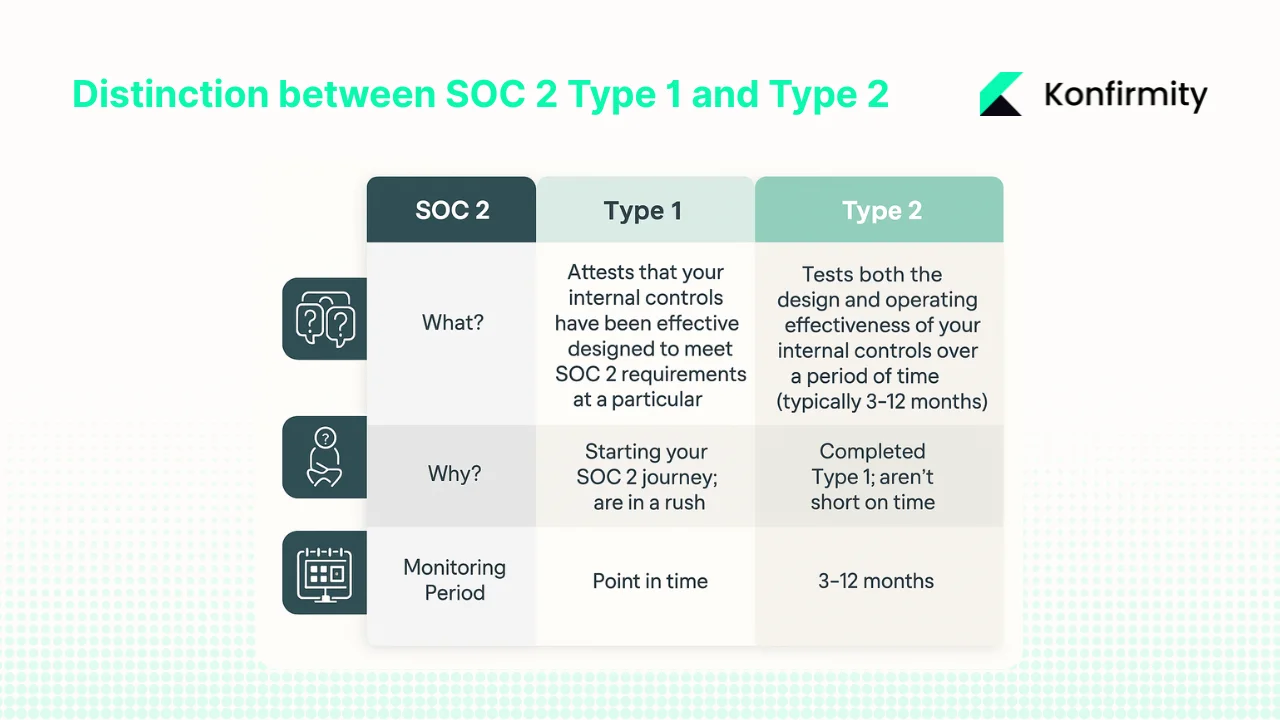
SOC 2 stands for System and Organisation Controls 2. It’s a framework created by the American Institute of Certified Public Accountants (AICPA) that evaluates a service provider’s ability to secure, process, and store client data. The framework is based on five Trust Services Criteria (TSC) – security, availability, processing integrity, confidentiality and privacy – and a formal report from an independent auditor shows whether you meet them. There are two report types:
-
Type I looks at the design of your controls at a single point in time. It tells a prospective client that you’ve defined policies and procedures.
-
Type II goes further: an auditor reviews evidence over a defined period (usually six to twelve months) to confirm the controls operate effectively. Because Type II demonstrates sustained security, it is the report most enterprise buyers request. In fact, a 2024 security study found that 78 % of large clients now require SOC 2 Type II certification from their service providers.
When you sell into healthcare or finance, getting a Type II report isn’t optional. Regulators and customers expect proof that your systems are secure all year, not just on paper. That’s where a SOC 2 Documentation Toolkit helps; it provides the templates, control mappings and evidence collection processes you need to maintain proof over time.
What the Trust Services Criteria imply for documentation
The Trust Services Criteria translate into concrete documentation requirements:
-
Security: Controls that prevent unauthorised access. Documentation should cover user authentication, least‑privilege access, network security, vulnerability management and monitoring. The security criterion is mandatory for every SOC 2 audit.
-
Availability: Systems must be available for operation. Documentation includes uptime targets, disaster recovery plans, backup schedules, and incident communication workflows.
-
Processing integrity: Your systems should process data completely and accurately. Auditors look for documented change management, code review procedures and monitoring of data pipelines to ensure they function as intended.
-
Confidentiality: Confidential information must be protected. Policies covering data classification, encryption, vendor management, and secure data disposal demonstrate you control access and disclosure.
-
Privacy: Personal information must be collected, used and retained appropriately. Documentation should describe consent management, privacy impact assessments and data subject requests.
The security criterion is the only mandatory element; the other criteria are chosen based on customer or regulatory demands. When you map each TSC to your policies and evidence, you create the backbone of your SOC 2 Documentation Toolkit.
Components of a SOC 2 Documentation Toolkit
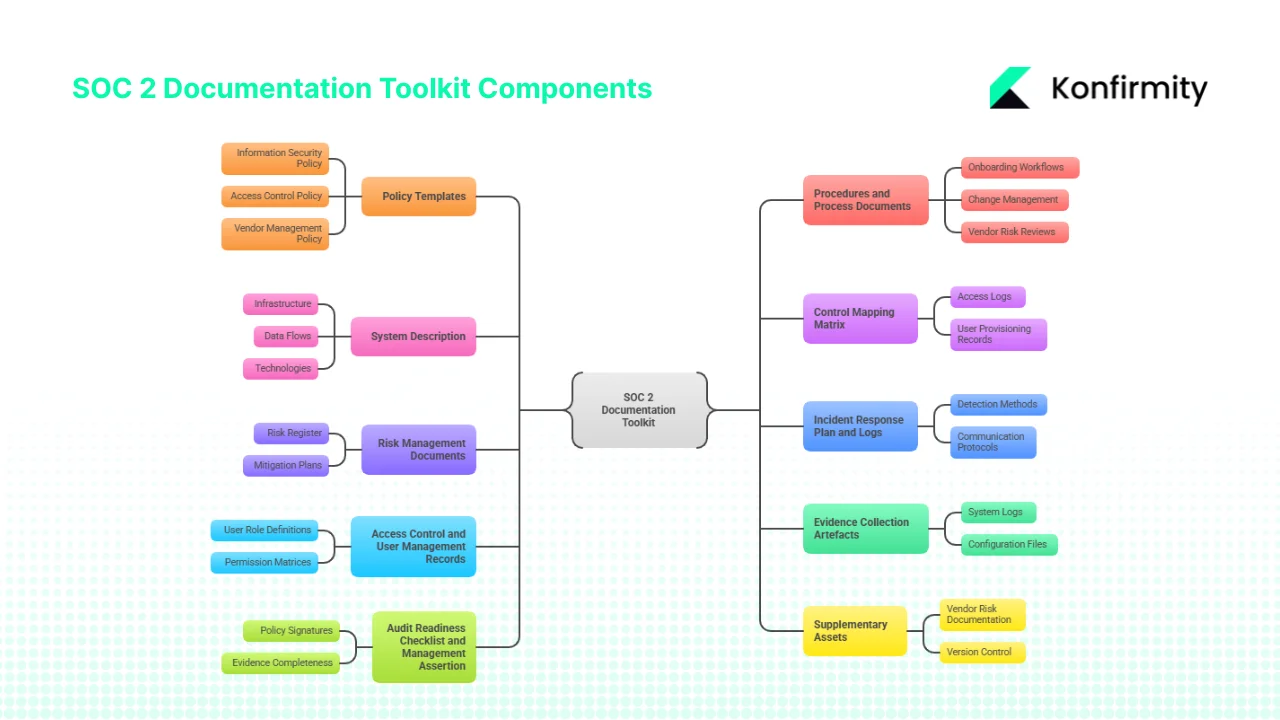
A SOC 2 audit isn’t just a policy checklist. It requires a coherent set of documents that prove how your controls operate. An effective SOC 2 Documentation Toolkit contains:
1. Policy templates
Written policies set expectations. Core templates include:
-
Information security policy: outlines security objectives, roles, and high‑level controls.
-
Access control policy: defines how you grant, modify, and revoke user permissions.
-
Vendor management policy: describes due diligence for third‑party service providers.
-
Data retention and classification policy: states how data is classified and how long it is kept.
-
Incident response policy: establishes how you detect, report, and resolve incidents.
2. Procedures and process documents
Policies need supporting procedures. These documents specify how tasks are carried out. They include onboarding and offboarding workflows, periodic access reviews, change management for system updates, patch management, and vendor risk reviews. A documented incident response workflow should mirror the phases defined by NIST: preparation (roles, tools and communication), detection and analysis (identifying and validating incidents), containment and eradication (isolating and removing malicious elements), and post‑incident activity (lessons learned).
3. System description
Auditors require a narrative describing your environment. This system description covers infrastructure, networks, services, data flows, and technologies in scope. It explains boundaries and identifies which systems are included in the audit, along with how data travels and who is responsible. This narrative should tie back to the Trust Services Criteria.
4. Control mapping matrix
A control matrix links each policy and procedure to the relevant TSC and points to evidence. For example, a row might show that the “access control policy” satisfies the security criterion and that access logs and user provisioning records serve as proof. A well‑maintained matrix makes it easy for auditors to trace controls to evidence.
5. Risk management documents
Risk management is a core requirement in the AICPA’s Common Criteria (CC3.1). A SOC 2 risk assessment identifies assets, threats, and vulnerabilities, evaluates their likelihood and impact, and documents mitigation plans. Auditors expect to see a risk register, a summary of controls addressing each risk, and evidence that the assessment is updated at least annually. For Type II reports, continuous monitoring of risks throughout the observation period is critical. Maintaining a SOC 2 Documentation Toolkit that includes risk assessments, mitigation plans and vendor risk questionnaires helps you stay compliant.
Documentation that reflects real controls wins audits. Paperwork alone does not.
Share your work email and build a toolkit auditors can trace from policy to practice.
6. Incident response plan and logs
A formal plan defines how you respond to incidents. It lists detection methods, escalation paths, decision‑makers, and communication protocols. Maintaining incident logs with dates, impact assessments, root cause analyses and remediation steps helps auditors verify that you follow your plan. NIST’s preparation and detection phases emphasise roles, training, monitoring tools, and evidence collection. Logs should cover all phases – from identification through recovery – and should be easily retrievable.
7. Access control and user management records
SOC 2 auditors scrutinise how you grant and revoke access. Your documentation toolkit should include user role definitions, permission matrices, onboarding and offboarding checklists, and periodic access review reports. These records prove that privileges are restricted to legitimate needs and that changes are approved and recorded.
8. Evidence collection artefacts
Evidence includes system logs, screenshots, configuration files, vulnerability scan results, audit trails, and meeting notes. Keeping this evidence organised in a repository – often a spreadsheet or compliance platform – prevents last‑minute scrambles. Each control should have a predefined evidence type and a place to store it.
9. Audit readiness checklist and management assertion
A checklist helps you track progress. It covers whether policies are signed, procedures are documented, controls are operating, and evidence is complete. A management assertion letter is a formal statement by company leadership describing the scope, the system, and the controls being attested to. Auditors require this letter as part of the report. Including it in your toolkit ensures you don’t overlook this step.
10. Supplementary assets
A thorough SOC 2 Documentation Toolkit also includes:
-
Vendor risk documentation: contracts, security questionnaires, and evidence of third‑party compliance. This is vital because supply‑chain weaknesses often lead to breaches. In 2025 the U.S. healthcare sector averaged 279 days to identify and contain a breach; third‑party vendors were central to mega breaches. Documenting vendor reviews reduces this risk.
-
Version control and audit logs: track changes to policies, procedures, and evidence. This maintains accountability and makes it easier to answer auditor questions.
-
Maintenance plan: schedule periodic reviews of policies and risk assessments, internal audits, and updates to procedures. This ensures documentation reflects the current environment rather than a static snapshot.
Free documentation toolkit
Free Download: The SOC 2 Documentation Toolkit
The full documentation set an audit asks for: a required-policy index mapped to the Common Criteria, a control matrix, a system description outline, a policy lifecycle tracker, and an evidence request log, just enter your work email.
Building your SOC 2 Documentation Toolkit: a step‑by‑step process
Step 1: Define the scope and trust criteria
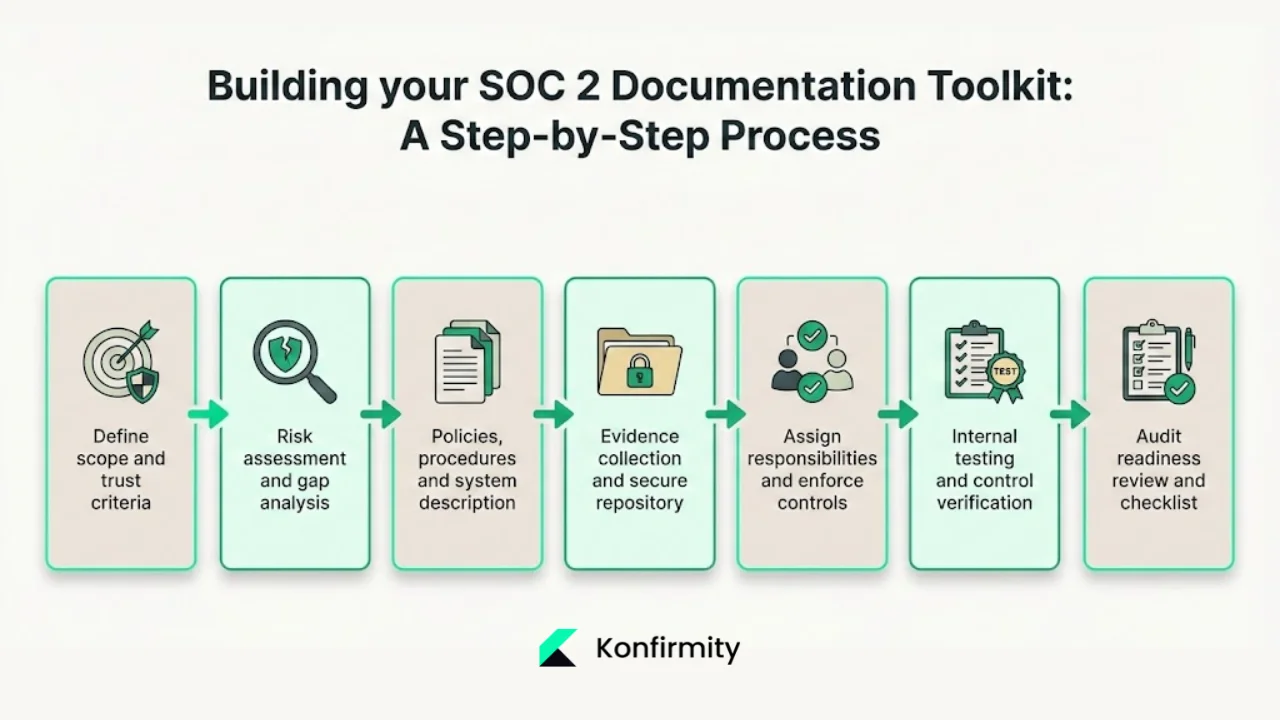
Identify which systems, services, data types and locations are in scope. Include infrastructure, software components, data flows, and third‑party services that process customer data. Decide which TSC applies. Security is mandatory; availability, processing integrity, confidentiality and privacy depend on customer and regulatory requirements. Defining scope early prevents audit surprises and helps focus your documentation.
Step 2: Conduct a risk assessment and gap analysis
Perform a structured risk assessment across people, processes and technology. Document assets, threats, vulnerabilities, and potential impacts. Evaluate likelihood and severity to prioritise mitigation. The AICPA’s CC3.1 expects this assessment, and auditors will ask when it was last updated. Next, map existing controls against the TSC using a control matrix. Identify gaps – missing policies, undefined procedures, or evidence shortfalls – and record them.
Step 3: Draft policies, procedures and system description
Using templates accelerates policy development and reduces errors. Start with an information security policy and add specific policies for access control, vendor management, data classification and incident response. Write procedures for daily operations: user provisioning, periodic access reviews, patch management, change control, vendor evaluations, logging, and incident handling. Develop a clear system description that explains how data flows through your environment and which components are in scope. This narrative helps auditors and clients understand the context.
Step 4: Set up evidence collection and a secure repository
Create a spreadsheet or use a compliance platform to manage evidence. Each control should have an associated evidence type and location. For instance, network security controls might map to firewall logs, while personnel controls map to training records and signed policies. Use a secure, central repository that supports versioning and audit logs. This not only prevents data loss but also provides proof of continuous compliance. Many companies use governance platforms to collect evidence automatically, reducing manual effort.
For a ready-made starting point, see our free SOC 2 evidence collection template and the full guide to structuring SOC 2 evidence.
Step 5: Assign responsibilities and enforce controls
Define who owns each control, who reviews evidence, and who approves policies. Without clear accountability, controls degrade over time. Ensure teams follow documented procedures: conduct regular access reviews, perform vendor assessments, triage incidents according to the incident response plan, and manage system changes with change tickets. Document approvals and test results for each control. This step turns policies into operational practice.
Step 6: Conduct internal testing and verify controls
Before the external audit, run internal tests. Sample user accounts to confirm least‑privilege access, verify that change requests have approvals, test the incident response plan through drills, and review vendor compliance documentation. Record test procedures, outcomes, remediation tasks, and evidence of resolution. This helps you identify and fix problems ahead of the auditor and demonstrates a proactive approach to security.
Step 7: Complete the audit readiness review and final checklist
Use your audit readiness checklist to confirm that all documents, evidence, and control mappings are complete. Check that the system description is current, that evidence covers the entire observation period for Type II, and that management is prepared to sign the assertion letter. Review alignment across departments – security, IT, human resources, legal and operations – to ensure that controls are applied consistently. Fix any remaining issues before inviting the auditor.
How pre‑built toolkits and managed services help
Building a SOC 2 Documentation Toolkit from scratch takes time. Many organisations underestimate the effort required and end up with disjointed documents. Pre‑built kits and managed services can speed up the process. For example, some compliance platforms provide policy templates, an evidence collection spreadsheet and an audit‑readiness checklist that reduces manual work. Others offer control mapping, vendor risk management and automated evidence collection, allowing teams to focus on remediation rather than paperwork.
Numbers illustrate the benefit of a structured approach. Konfirmity, a security-driven compliance platform you can run self-serve or fully managed, draws on experience from more than 6,000 security audits and 25 years of combined expertise. Using evidence templates and automation, Konfirmity reduces audit preparation time by about 75 % and helps clients achieve SOC 2 readiness in four to five months, compared with nine to twelve months for self‑managed programmes. Clients typically spend under 70 hours per year on evidence tasks when using Konfirmity, versus 550–600 hours in self‑managed programmes. These numbers show how a well‑structured SOC 2 Documentation Toolkit coupled with expert support lowers effort and accelerates sales cycles.
Another reason to invest in a toolkit: the financial impact of breaches keeps rising. IBM’s 2024 Cost of a Data Breach Report placed the global average at $4.88 million, a 10 % increase over 2023, and noted that breaches lasting over 200 days cost roughly $5.46 million, compared with $4.07 million for faster containment. U.S. healthcare breaches in 2025 averaged 279 days to identify and contain. Effective documentation and controls shorten detection and response times, limiting exposure. Penalties also rise: the Office for Civil Rights collected $9.9 million from 22 enforcement actions in 2024, and per‑violation fines range from $141 to over $2 million, depending on culpability. A properly maintained SOC 2 Documentation Toolkit helps you avoid such penalties by ensuring controls are implemented and evidence is ready.
A managed service goes beyond templates. Konfirmity is a security-driven compliance platform you can run self-serve or have fully managed. With the fully-managed service, dedicated experts implement controls inside your environment, monitor them year-round, and support you during audits. Konfirmity designs controls that also meet ISO 27001, HIPAA and GDPR requirements, allowing you to reuse evidence across frameworks and avoid duplication.
Best practices and common pitfalls
Best practices
-
Centralise documentation: Keep policies, procedures, risk assessments and evidence in one secure repository with version control. This ensures consistency and makes retrieval easy for audits.
-
Review and update regularly: Security isn’t static. Update policies, risk assessments and system descriptions when there are changes in infrastructure, vendors or regulations. Conduct internal audits to verify control operation.
-
Assign clear ownership: Each control should have an owner and a reviewer. Cross‑functional involvement across IT, security, human resources and legal reduces blind spots.
-
Manage vendors diligently: Maintain a catalogue of third‑party services, perform security reviews and ensure contracts include appropriate data protection clauses. Document evidence of compliance and periodically reassess vendor risk.
-
Use control mapping and gap analysis early: Build your control matrix at the start of the project. Identify gaps and fix them before the observation period begins to avoid surprises later.
Common pitfalls
-
Outdated or incomplete policies: Policies that don’t reflect current operations undermine credibility. Auditors quickly spot gaps between documented controls and real‑world practices.
-
Missing or inconsistent evidence: Logs or screenshots must cover the entire audit period. Failing to collect evidence in real time results in last‑minute scrambles and weak reports.
-
Siloed compliance: Treating compliance as the security team’s problem ignores dependencies on human resources (background checks, training), legal (contract clauses) and operations (incident communications). Lack of collaboration creates holes.
-
“Paper controls”: Policies that look good but aren’t followed in practice lead to findings. Auditors test operational effectiveness, not just documentation. Ensure every control is embedded in day‑to‑day processes.
Make your documentation trace back to live controls
Book a demo and we'll show how Konfirmity links each policy to the control it describes and the evidence that control produces, so the toolkit stays current instead of ageing in a folder.
Book a demo
Conclusion
Building a SOC 2 Documentation Toolkit is vital for companies that want to close enterprise deals. It isn’t just about checking boxes; it’s about proving that your security programme operates consistently over time. A strong toolkit provides policy templates, procedures, risk assessments, a system description, a control matrix, evidence logs and an audit readiness checklist. Following a structured approach – from defining scope to conducting risk assessments, drafting policies, collecting evidence, assigning responsibilities, testing controls and performing readiness reviews – turns a daunting project into a manageable process. Managed services and pre‑built toolkits can shorten the timeline and reduce effort, but they must be grounded in real security controls and continuous monitoring. With the right documentation and expert support, you demonstrate control maturity, speed up procurement, and reduce the risk of breaches and penalties. A SOC 2 Documentation Toolkit isn’t a one‑off project; it’s a living system that evolves with your organisation.
FAQs
Your SOC 2 documentation should include policies (information security, access control, vendor management, data retention, incident response), procedures (onboarding/offboarding, access reviews, change management, patching, vendor assessments, incident handling), a system description, a control matrix mapping controls to the TSC, risk assessments and mitigation plans, vendor questionnaires, evidence logs (system logs, screenshots, audit trails), incident response logs, access control records, an audit readiness checklist, and a management assertion letter.
No. Templates are allowed and often beneficial. Many compliance kits and platforms provide pre‑built policy templates and evidence collection spreadsheets. You should customize them to reflect your actual environment and processes. Pre‑built tools accelerate progress but don’t replace real control implementation.
Start early – ideally before onboarding large clients. Early scoping, risk assessment and policy development help you identify gaps and avoid delays. Because Type II audits review evidence over time, you need controls running before the observation window begins.
Include vendor risk assessments, due‑diligence records, signed contracts, third‑party security attestations and questionnaires. Map vendor controls to your control matrix for vendor management. Document onboarding, ongoing monitoring and periodic reviews to show that you manage vendor risk.
Yes. Many controls overlap across frameworks such as ISO 27001, HIPAA and GDPR. A well‑designed SOC 2 Documentation Toolkit can serve as a foundation for other certifications. For example, risk assessments, access control records and incident response plans are common across frameworks. Designing controls with multiple standards in mind reduces duplication and speeds up future audits.







