Healthcare organizations handle some of the most sensitive data possible. A single breach not only disrupts patient care but also triggers federal oversight, lawsuits, and reputational harm. According to IBM’s 2025 Cost of a Data Breach study, the U.S. average cost per breach reached $10.22 million, with healthcare organizations averaging $7.42 million despite a slight decline from 2024. Breaches take about 279 days to identify and contain—an eternity in clinical workflows. These costs are compounded by regulatory penalties: the HHS Office for Civil Rights (OCR) focused 76 percent of its enforcement actions in 2025 on risk‑analysis failures, demonstrating that audits uncover the same gaps repeatedly.
Audits are not punitive by design; they are tools to improve operations. Findings reveal gaps between written policies and real practice, highlight outdated controls, and show whether teams are logging evidence properly. When acted upon, findings help organizations reduce attack surfaces, strengthen patient trust, and accelerate contract approvals. Throughout this article, the term HIPAA Common Audit Findings refers to typical deficiencies identified during OCR or internal audits under the HIPAA Security, Privacy, and Breach Notification Rules.
What Are HIPAA Audits?
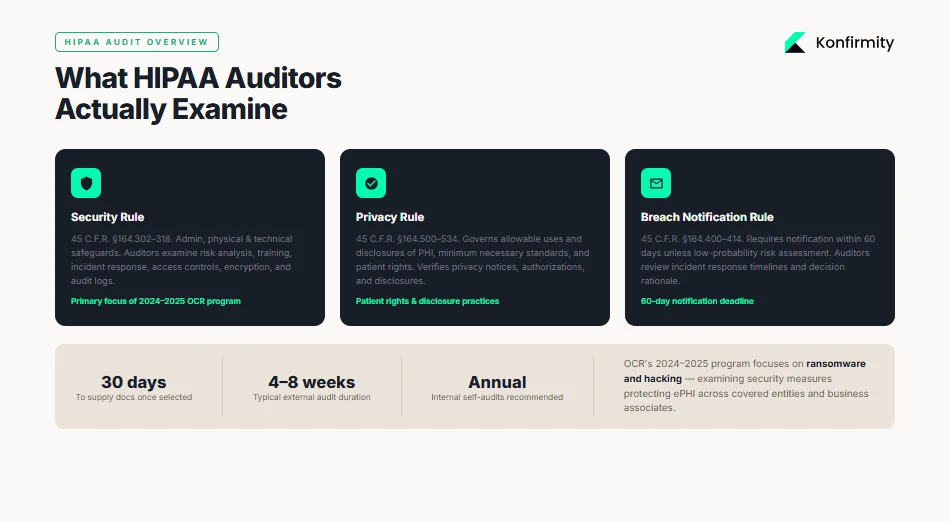
The OCR periodically launches audit programs to assess how covered entities and business associates implement HIPAA’s requirements. The 2024–2025 audit program focuses on hacking and ransomware provisions, examining the security measures that protect electronic protected health information (ePHI). OCR audits may be external (federal investigators) or internal (self‑audits performed by the organization or a managed service like Konfirmity). For what a federal or third-party review actually involves, see our HIPAA external audit guide. Both types examine three main rules:
-
Security Rule (45 C.F.R. §164.302–318): sets administrative, physical, and technical safeguards for ePHI. Auditors look at risk analysis, training, incident response, access controls, encryption, and audit logs.
-
Privacy Rule (45 C.F.R. §164.500–534): governs allowable uses and disclosures of PHI, minimum necessary standards, and patient rights. Audits verify whether privacy notices, authorizations, and disclosures comply.
-
Breach Notification Rule (45 C.F.R. §164.400–414): requires covered entities to notify affected individuals and HHS within 60 days unless a risk assessment determines a low probability of compromise. Auditors review incident response timelines and decision rationale.
Audit Process and Timelines
For the full mechanics of how these reviews unfold, see our HIPAA audit timeline guide. OCR audits typically begin with a pre‑audit questionnaire requesting policy documents, risk analyses, training records, and incident logs. Once selected, an entity often has 30 days to supply documentation; the on‑site or remote review follows. Audit length varies depending on scope; Konfirmity’s experience across 6,000+ security audits shows that external reviews last 4–8 weeks, while a complete SOC 2 or ISO 27001 program (which many healthcare vendors pursue alongside HIPAA) can take 4–5 months to reach readiness. Internal self‑audits should occur annually, but high‑risk areas may require quarterly reviews.
Why Audit Findings Often Occur
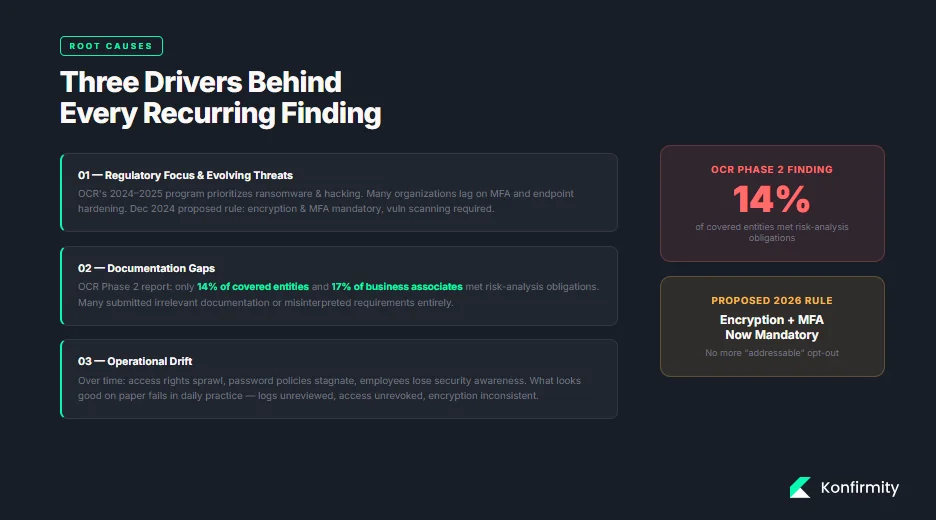
Audit findings often stem from three drivers:
-
Regulatory Focus and Evolving Threats. The OCR’s 2024–2025 program prioritizes ransomware and hacking. Attackers constantly evolve, but many organizations lag in adopting multi‑factor authentication or hardening endpoints. Regulations also evolve: a December 2024 proposed rule would make encryption at rest and in transit mandatory, require multi‑factor authentication, and mandate vulnerability scanning and penetration testing.
-
Documentation Gaps. Policies may exist but remain outdated, incomplete, or not implemented. The OCR’s Phase 2 report found that only 14 percent of covered entities and 17 percent of business associates met risk‑analysis obligations. Many submitted irrelevant documentation or misinterpreted requirements, showing a disconnect between policy and evidence.
-
Operational Drift. Over time, access rights sprawl, password policies stagnate, and employees lose awareness of security protocols. Internal audits often reveal that what looks good on paper falls apart in daily practice—logs aren’t reviewed, user access isn’t revoked, and encryption is inconsistent.
Understanding these drivers helps compliance teams anticipate where HIPAA Common Audit Findings will appear and prepare accordingly.
Top HIPAA Common Audit Findings (With Practical Context)
1) Lack of Risk Analysis
A risk analysis is the bedrock of HIPAA compliance; our HIPAA gap assessment guide walks through how to run one. HHS guidance states that entities must identify all ePHI, document how it is created, received, stored, and transmitted, assess threats and vulnerabilities, evaluate current security measures, and determine the likelihood and impact of potential threats. This process must be documented and updated regularly.
Unfortunately, audits frequently reveal incomplete or outdated analyses. The OCR’s Phase 2 report noted that most entities failed to identify all repositories of ePHI, assess threats realistically, or update analyses. Konfirmity often sees risk analyses that list network servers but omit cloud applications, backups, or third‑party systems.
What auditors look for: evidence that the organization has considered all systems and data flows, rated risks based on likelihood and impact, and mapped these to controls. They also want to see that the analysis is updated after significant changes—such as new applications, mergers, or major incidents.
Mini template for a risk‑analysis record:
| Element | Description |
|---|---|
| Scope | List all locations, systems, applications, vendors, and storage media handling ePHI. |
| Data collection | Identify how ePHI is created, received, stored, or transmitted. Include cloud services and backups. |
| Threats/Vulnerabilities | Document potential threats (e.g., ransomware, insider abuse, natural disasters) and vulnerabilities (e.g., unpatched software). |
| Current controls | Describe existing administrative, physical, and technical safeguards. |
| Likelihood/Impact | Estimate the probability and severity of each threat exploiting each vulnerability. |
| Risk rating and mitigation | Assign risk levels (e.g., high/medium/low) and propose remediation actions and timelines. |
| Update cadence | Specify update frequency (e.g., annually or after major changes). |
2) Security Incidents and Incident Reporting Gaps
The Security Rule requires covered entities to implement procedures to respond to and report security incidents (§ 164.308(a)(6)). Yet many organizations lack documented incident‑response plans or fail to log incidents properly. Incident reports should capture what happened, how the organization responded, and lessons learned. Without this, teams cannot show auditors that incidents were handled promptly and appropriately.
Common lapse: Some teams treat minor security events (e.g., phishing attempts or malware quarantines) as routine help‑desk tickets rather than security incidents. When auditors request evidence, there’s no central log or documented response workflow.
Step‑by‑step incident reporting checklist:
-
Identify and triage the event. Determine if the event constitutes a security incident under your policy. Include ransomware, unauthorized access, system failures, and suspicious network activity.
-
Contain and mitigate. Isolate affected systems, reset credentials, and block malicious traffic. Document actions and times.
-
Assess impact and likelihood of compromise. Evaluate whether ePHI was accessed or exfiltrated. Use the four‑factor test from the Breach Notification Rule—nature of the data, unauthorized persons, whether the PHI was actually acquired or viewed, and whether risk was mitigated.
-
Notify stakeholders. Depending on severity, notify senior leadership, IT, legal, and, if needed, law enforcement. For notifiable breaches, send patient and HHS notifications within 60 days.
-
Document details. Record the timeline, systems involved, root cause, remediation steps, impact, notifications, and follow‑up tasks.
-
Review and improve. Update policies, training, and controls based on lessons learned.
3) Unauthorized Access
Unauthorized access remains one of the most persistent HIPAA Common Audit Findings. Insider threats are particularly prevalent: the 2023 Protenus report cited by Tricerat notes that unauthorized access by insiders accounted for 93 percent of reported incidents, and human factors such as social engineering influenced 74 percent of breaches. Real‑world cases illustrate the impact:
-
Montefiore Medical Center experienced a breach where a former employee stole patient data; the stolen information was used to open fraudulent credit lines.
-
HCA Healthcare (July 2023) suffered a breach when an external storage location used for email formatting was accessed without authorization, exposing contact details and appointment dates.
-
Memorial Healthcare Systems paid $5.5 million to settle potential violations after investigators found that login credentials of a former employee were used for a year to access ePHI, affecting 80,000 patients. The healthcare system had policies but failed to modify access rights and review audit logs regularly.
Access control improvements: Use identity and access management (IAM) tools to implement least‑privilege and role‑based access. Establish procedures to promptly revoke access when employees change roles or leave. Conduct quarterly access reviews to validate that each user’s privileges remain appropriate.
4) Insufficient Training
The Security Rule’s administrative safeguards require workforce training and sanctions for violations. Training must cover policies, phishing awareness, secure handling of ePHI, incident reporting, and device‑usage rules. Despite these requirements, auditors often find missing training records or training that is too generic. Training is frequently a one‑time onboarding activity rather than an ongoing program. A 2024 Censinet study found that 41 percent of healthcare organizations have only partial HIPAA safeguards; training gaps were among the top deficiencies.
Typical audit flags: missing attendance logs, no record of training dates, outdated materials, or insufficient documentation on sanctions for non‑compliant employees.
Quick employee training log template:
| Field | Description |
|---|---|
| Employee name and role | Identify the staff member and job function. |
| Training date | Record the date of each training session. |
| Content modules | List topics covered (e.g., Privacy Rule overview, phishing awareness, incident response). |
| Trainer or system | Note whether training was live, online, or self-paced. |
| Assessment results | Include quiz scores or certification status. |
| Certification expiration | Track when retraining is due. |
5) Inadequate Policies and Procedures
Auditors expect documented policies to match actual practice. Policies should cover administrative safeguards (risk analysis, workforce training, sanctions), physical safeguards (facility access, device security), and technical safeguards (access controls, authentication, audit controls, encryption). Yet many organizations rely on generic templates or outdated policies that don’t reflect their environment. The OCR’s 2025 enforcement data shows multiple settlements for failure to have adequate policies and procedures, including Catholic Health Care Services’ $650,000 settlement for lacking a comprehensive risk analysis and risk management plan.
Drafting vs. enforcing: Having a policy document is not enough. Auditors will compare policy language to actual controls. For example, a policy might require multi‑factor authentication for remote access, but if staff still use only passwords, the policy is unenforced. Similarly, a policy may specify quarterly access reviews, but logs show none were performed.
Sample administrative safeguards policy outline:
-
Purpose and scope – define why the policy exists and whom it covers.
-
Risk analysis process – describe methodology, responsible roles, and review frequency.
-
Workforce training – outline training topics, schedules, and documentation.
-
Incident response – define incident types, escalation, communications, and documentation.
-
Sanctions – describe disciplinary measures for non‑compliance.
-
Review cycle – specify how often the policy is reviewed and updated.
6) Poor Encryption Practices
Encryption of ePHI at rest and in transit is an addressable requirement under the Security Rule, meaning it must be implemented unless an alternative measure provides equivalent protection. HHS proposed in late 2024 to make encryption mandatory, including multi‑factor authentication and vulnerability scanning. The HIPAA Journal notes that encryption is one of the most effective safeguards; breaches of encrypted data are not reportable unless the decryption key is compromised. Yet auditors still encounter unencrypted laptops, backup tapes, and portable devices.
Recent penalties illustrate the risk:
-
Children’s Medical Center of Dallas received a $3.2 million civil penalty for failing to address known risks, including not encrypting portable devices.
-
Catholic Health Care Services of Philadelphia paid $650,000 for failing to encrypt data and perform an enterprise‑wide risk analysis.
-
Lifespan Health System paid $1.04 million after an unencrypted laptop containing 20,431 patients’ ePHI was stolen.
Encryption checklist:
| Item | At rest | In transit |
|---|---|---|
| Identify assets | Inventory all servers, desktops, laptops, mobile devices, removable media, backups, and cloud storage containing ePHI. | Inventory network paths, APIs, VPNs, email, messaging apps, and cloud communications handling ePHI. |
| Encryption method | Implement full-disk encryption for laptops and servers; use database encryption (TDE) for structured data; encrypt backups. | Use TLS 1.2+ or higher for all network communications; apply secure email gateways or secure messaging; enforce VPN or secure channel for remote access. |
| Key management | Store encryption keys in hardware security modules (HSM) or managed key services; rotate keys regularly. | Separate keys from encrypted channels; implement certificate management with expiry monitoring. |
| Validation and monitoring | Periodically test encryption (e.g., verify devices are encrypted and cannot boot without credentials). | Use network scanners to detect unencrypted services; monitor certificate expiration and TLS configuration. |
Fix the controls that keep showing up in HIPAA audit findings.
Share your work email and address the security issues OCR actually penalizes.
7) Missing or Incomplete Audit Logs
Audit controls are required under § 164.312(b). Logs must capture who accessed systems, when and from where, what operations were performed, and whether access was successful. The SecurityMetrics blog highlights that logs should record logins, updates, ePHI access, password changes, and other user actions. Events should trigger alerts for irregular activity, and logs must be retained for at least six years.
Lack of logging contributes to major breaches. In the Memorial Healthcare Systems case, audit logs were not reviewed regularly; a former employee’s credentials were used for a year to access ePHI. OCR Acting Director Robinsue Frohboese explained that lack of access controls and regular log review allows hackers or insiders to cover their tracks. Without logs, organizations cannot detect or investigate unauthorized activity.
Audit log requirements template:
| Requirement | Detail |
|---|---|
| Systems covered | EHR platforms, databases, file servers, email systems, cloud services, endpoints, firewalls, VPNs, and any application handling ePHI. |
| Data captured | Username, user role, timestamp, IP address or device ID, action performed (view, create, update, delete, export), resource accessed, success/failure status. |
| Alerting | Trigger alerts for unusual patterns (e.g., after-hours access, large downloads, access from unknown locations). |
| Retention | Keep logs for at least six years as required by OCR. |
| Review frequency | Review logs at least weekly for high-risk systems; implement automated correlation and anomaly detection. |
| Segregation of duties | Ensure that logging, monitoring, and investigation roles are separated to prevent conflicts of interest. |
8) Weak Password Policies
Passwords remain a fundamental access control. However, outdated policies that require complexity but allow short lengths or reuse have not kept up with modern password‑cracking tools. The 2025 NIST guidelines recommend a minimum length of eight characters, with a strong recommendation to extend to 15 characters. They also advise eliminating rigid composition rules (e.g., mandatory uppercase letters or symbols), allowing all printable characters, and focusing on length and memorability. NIST suggests implementing real‑time blocklists to prevent users from choosing passwords known to be compromised. Organizations should encourage password managers and adopt multi‑factor authentication for critical systems.
Weak password policies show up in audits when user accounts are protected by default or shared passwords, when password histories are not enforced, or when no mechanism blocks common passwords. Auditors may test accounts using password‑guessing tools or review authentication settings.
Example password policy snippet:
-
Enforce a minimum password length of 12 characters, allowing passphrases with spaces.
-
Permit all printable ASCII and Unicode characters; do not require specific character types.
-
Implement password blocklists that prevent the use of commonly breached or easily guessed passwords.
-
Require multi‑factor authentication for remote and privileged access.
-
Encourage the use of password managers; do not enforce periodic password resets unless evidence indicates compromise.
9) Failure to Conduct Regular Reviews
Risk analyses, access rights, and control effectiveness cannot be static. The Security Rule requires periodic evaluations of policies and procedures to keep them current. Auditors often find that once an organization completes an initial risk analysis, it never revisits it. Similarly, user access reviews or vulnerability scans may occur only after an incident.
Konfirmity sees that high‑growth healthcare vendors and hospital IT teams often prioritize product releases over reviewing controls. As a result, stale risk analyses fail to account for new cloud services or integrations. To address this, schedule regular reviews:
-
Annual risk analysis: update the risk assessment every 12 months or when significant changes occur. Include new systems and threats.
-
Quarterly access reviews: validate that each user’s privileges align with job duties; revoke or adjust as necessary.
-
Monthly vulnerability and patch management reviews: ensure that all systems are patched and that vulnerability scans are completed.
-
Policy review: refresh policies at least annually to reflect new regulations, technologies, and business processes.
Annual review schedule example:
| Review | Frequency | Responsible roles |
|---|---|---|
| Risk analysis update | Annually (or after major changes) | Compliance lead, IT/security, risk officer |
| Access rights review | Quarterly | IT/security, HR, department managers |
| Incident log review | Weekly (critical systems), monthly (others) | Security analyst |
| Policy update | Annually | Compliance lead, legal counsel |
| Training refresh | Annually | HR, compliance, departmental leaders |
10) Improper Data Disposal
HIPAA requires that PHI and ePHI be destroyed securely when no longer needed. The HIPAA Journal’s 2026 update notes that improper disposal remains a common violation; fines have been levied against organizations for disposing of specimen containers, paper records, and devices in regular trash. Examples include:
-
New England Dermatology and Laser Center paid $300,640 for disposing of specimen containers with PHI in regular trash.
-
Parkview Health paid $800,000 after failing to securely dispose of 5,000–8,000 patient records.
-
FileFax Inc. paid $100,000 for leaving hundreds of boxes of medical records in an unlocked truck.
Step‑by‑step data destruction log template:
-
Identify items for disposal: list physical files, hard drives, backup tapes, CDs/DVDs, and devices containing ePHI.
-
Classify retention requirements: verify that retention periods have expired (e.g., six years under HIPAA documentation rules). If not, schedule later disposal.
-
Select destruction method: shredding, pulping, or incineration for paper; degaussing, cryptographic erasure, or physical destruction for electronic media.
-
Record details: log the date, location, serial number of devices or box numbers, method of destruction, and personnel involved.
-
Witness and sign off: have two staff members sign the log; if a third‑party vendor is used, retain certificates of destruction.
-
Update asset inventory: remove the destroyed items from inventory to prevent accidental reuse.
How to Interpret HIPAA Audit Findings
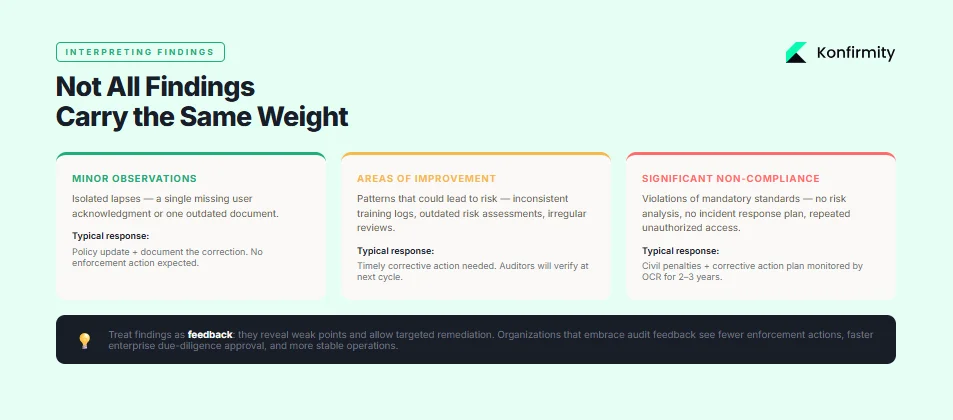
Not all findings carry the same weight. Auditors usually categorize findings into minor observations, areas of improvement, and significant non‑compliance. Minor observations highlight isolated lapses (e.g., a single missing user acknowledgment) and often require policy updates. Areas of improvement indicate patterns that could lead to risk—such as inconsistent training logs or outdated risk assessments—and need timely corrective action. Significant non‑compliance involves violations of mandatory standards or repeated failures (e.g., no risk analysis, no incident response plan, repeated unauthorized access). These can result in civil penalties, corrective action plans, and reputational damage.
Corrective action plans typically require the organization to conduct a comprehensive risk analysis, implement missing controls, revise policies, and train staff—often under OCR monitoring for two to three years. While burdensome, these plans provide a clear roadmap to compliance. For managers, treat findings as feedback: they reveal weak points, allow targeted remediation, and ultimately strengthen the program. In Konfirmity’s experience, organizations that embrace audit feedback see fewer enforcement actions, faster due‑diligence approval from enterprise customers, and more stable operations. Turning that feedback into a durable program is the focus of our HIPAA readiness guide.
Findings map back to specific audit inquiries; our HIPAA audit checklist lists each one with the evidence that closes it.
Step‑by‑Step Guide to Addressing Common Findings
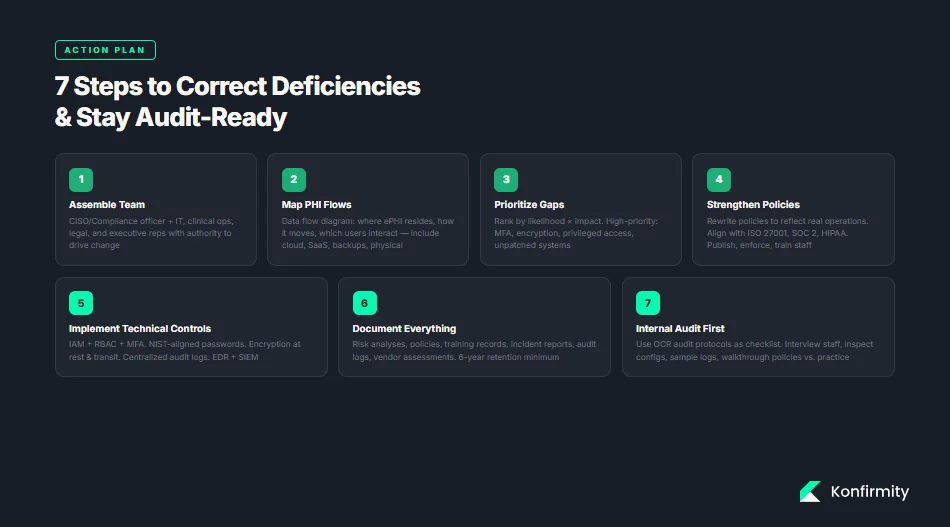
Use the following action plan to correct deficiencies and stay prepared for future audits.
Step 1: Assemble Your Compliance Team
Designate a core team with representation from IT/security, compliance/legal, clinical operations, and executive leadership. Assign a program owner (Chief Information Security Officer or Compliance Officer) who has authority to drive change. Clarify roles: who will update policies, manage risk analysis, oversee training, handle incidents, and interact with auditors.
Step 2: Map Your PHI and ePHI Flows
Create a data flow diagram that shows where ePHI resides, how it moves across systems, and which users interact with it. Include cloud applications, SaaS vendors, integrations, backups, and physical locations. This map informs risk analysis, access control, and vendor management. Updating the map quarterly or after significant changes helps maintain an accurate inventory.
Step 3: Prioritize the Most Risky Gaps
Not all gaps pose equal risk. Use the risk analysis to rank vulnerabilities by likelihood and impact. Typically, risk analysis failures, unauthorized access, encryption, and incident response appear in top positions. Focus remediation on high‑impact, high‑likelihood issues first: implement multi‑factor authentication, update encryption, review privileged access, and fix unpatched systems. Use metrics like CVSS scores, attack surface area, and potential patient impact.
Step 4: Strengthen Policies and Training Programs
Rewrite policies so they reflect current operations and best practices. Align with frameworks like ISO 27001 (Annex controls), SOC 2 Trust Services Criteria, and HIPAA requirements. Publish policies internally and enforce them. Update training materials to cover new threats (e.g., phishing, ransomware, social engineering), regulatory changes (e.g., encryption, multi‑factor), and internal workflows. Use the training log template to record participation and ensure annual refreshers for all staff. Implement sanctions for non‑compliance.
Step 5: Implement Technical Controls
Deploy or enhance technical safeguards:
-
Access controls and IAM: implement least‑privilege, RBAC, single sign‑on, and multi‑factor authentication for all remote and privileged access. Perform quarterly access reviews.
-
Password policies: adopt NIST‑aligned password length and blocklist recommendations. Encourage passphrases, use password managers, and retire outdated complexity rules.
-
Encryption: encrypt ePHI at rest and in transit; maintain key management and monitor encryption status.
-
Audit logging: enable logging on all systems handling ePHI, centralize logs, and implement alerting for anomalies. Retain logs for six years and review regularly.
-
Incident monitoring and response tools: use endpoint detection and response (EDR), security information and event management (SIEM), and vulnerability scanners to identify and respond to threats quickly.
Step 6: Document Everything
Documentation is evidence. Maintain clear records of risk analyses, mitigation plans, policies, training attendance, incident reports, audit logs, and vendor assessments. Keep documentation for at least six years. When auditors request evidence, well‑organized documentation speeds up the process and demonstrates maturity.
Step 7: Internal Audit Before OCR
Regular self‑audits catch issues early and foster a culture of continuous improvement; see our HIPAA internal audit guide for a full playbook. Use OCR audit protocols as a checklist to verify compliance with each standard. Consider an independent review by a managed service or external auditor to provide objective feedback. Internal audits should include interviews with staff, inspection of technical configurations, sampling of logs and records, and walkthroughs of policies versus practice.
Tools and Templates to Make Audits Easier
Healthcare teams often struggle with the administrative burden of compliance. To streamline operations, use the following tools and templates:
-
Risk analysis worksheet: a structured spreadsheet or GRC tool that prompts you to list assets, threats, vulnerabilities, existing controls, and risk ratings. Include update dates and responsible owners.
-
Incident report form: a standardized form capturing incident type, date/time, systems involved, actions taken, notification requirements, and remediation steps. Use digital forms to ensure consistency and central storage.
-
Policy checklists: a list of required policies mapped to HIPAA, ISO 27001, and SOC 2 criteria (e.g., risk management, access control, data classification, vendor management). Mark policies as drafted, approved, implemented, and reviewed.
-
Training attendance tracker: track which employees completed specific training modules, their scores, and upcoming expiration dates. Automate reminders when retraining is due.
-
Audit log capture format: define log fields and retention periods as described in the audit log template. Include guidelines for reviewing logs and responding to alerts.
Konfirmity’s managed service includes these templates and integrates them into a single compliance portal, saving teams 75–80 percent of the internal effort normally required for HIPAA and SOC 2 readiness. Our clients typically achieve audit readiness in 4–5 months rather than 9–12 months when self‑managed, with significantly fewer findings during external audits.
Free download
The HIPAA Audit Request List
Every finding above as a tracker: rule citation, evidence owner, where the evidence lives, and the date it was last refreshed — plus worked risk analysis, PHI inventory, training and log-review tabs. Enter your work email and we'll send the PDF.
FAQ
Audits may be triggered randomly by OCR’s audit programs, by reported breaches, by patient complaints, or as part of an enforcement action following a settlement. OCR also conducts desk audits requesting policies and evidence. Internal self‑audits should be performed annually or more often depending on risk exposure.
Best practice is to conduct a comprehensive risk analysis annually and after major changes. Access reviews, training updates, and vulnerability scans should occur quarterly or monthly. Logs should be reviewed weekly for critical systems. Many organizations embed continuous monitoring and quarterly reviews to catch drift early.
Under current HIPAA rules, encryption is an addressable implementation specification—meaning organizations must implement it if reasonable and appropriate or adopt an alternative security measure. Proposed rules may make encryption mandatory. Audit logs are required (§ 164.312(b)); they must capture system activity and be retained for at least six years.
Findings are categorized by severity. Minor issues may require policy revisions or training. Significant findings can lead to corrective action plans monitored by OCR for two to three years. Organizations must address the root cause, implement controls, and submit regular reports. Failure to comply can lead to civil penalties.
Typically, entities have 30 days to provide requested documentation once selected. Timelines can vary depending on the scope and whether extensions are granted. Prompt responses and organized evidence can shorten the audit process.
Yes. Regardless of size, following the same structured approach—conduct thorough risk analyses, implement appropriate technical safeguards, train staff, maintain logs, review controls regularly, and document everything—will minimize findings. Small practices may benefit from managed services that provide expertise and templates without the overhead of building a full internal compliance team.
See your real HIPAA audit findings before an auditor does, not a guess
Book a demo and we'll map your controls against the Security Rule requirements, self-serve or with our CISO-led team running it for you.
Book a demo
Conclusion
HIPAA Common Audit Findings are not random; they reflect predictable operational gaps. The most frequent issues—risk analysis failures, inadequate incident response, unauthorized access, insufficient training, outdated policies, poor encryption, missing logs, weak passwords, lack of regular reviews, and improper disposal—are all fixable with disciplined processes and modern tools. By following the step‑by‑step guidance here, healthcare organizations can build a security program that stands up to auditors, enterprise buyers, and adversaries alike. Konfirmity’s experience shows that human‑led, managed security and compliance delivers sustained results: we build controls inside your stack, run the program daily, and keep you audit‑ready year‑round. Security that reads well but fails under incident pressure is a liability. Build the program once, operate it continuously, and let compliance follow.