Logging is often treated as a storage problem, but for enterprise-grade security, it is an analysis and verification problem. In the context of ISO 27001, a logging pipeline is the structured process of generating, collecting, normalizing, and analyzing event data to ensure that security controls function as intended. It is the bridge between a static policy and an operational reality.
At Konfirmity, having supported over 6,000 security audits with 25+ years of combined technical expertise, we observe a consistent pattern: companies that fail their ISO 27001 surveillance audits often do so because their logs are fragmented, incomplete, or untrusted. A pile of text files on a server is not a pipeline. An automated, integrated, and monitored stream of data is.
This article outlines how to build these pipelines within the broader ISMS lifecycle. You will learn the specific policy requirements of Annex A.8.15, the technical anatomy of a modern pipeline, and a ten-step implementation guide that favors durable security over mere paper promises.
Why Logging Matters in ISO 27001 Compliance
ISO 27001:2022 is not satisfied with the mere existence of logs. It demands that logs be produced, stored, protected, and analyzed. This is where many organizations struggle, as they focus on collection while ignoring analysis. Effective Logging Pipelines For ISO 27001 provide the transparency needed to satisfy both internal stakeholders and external auditors.
What ISO 27001 Says About Logging
Annex A.8.15 (Logging) in the 2022 revision of the standard specifically requires organizations to record logs of activities, exceptions, faults, and other relevant events. The purpose is to support security monitoring and incident response. The standard emphasizes that these logs must be protected against tampering and unauthorized access, ensuring the integrity of the audit trail.
Logging As a Core Part of Your ISMS
An ISMS is a living system. Logging supports the risk assessment process by providing data on actual threat patterns. It acts as the primary evidence source for the Statement of Applicability (SoA), proving that technical controls like access management and encryption are functioning correctly. Without centralized logging, proving compliance requires manual, time-consuming screenshots—a practice that fails under the scrutiny of an enterprise-grade audit.
Main Security Drivers for Logging
Beyond the audit, three drivers define the need for these pipelines:
- Real-Time Threat Detection: Automated alerts allow security teams to respond to brute-force attacks or privilege escalation within minutes, not weeks.
- Forensic Investigation: According to the IBM Cost of a Data Breach Report 2025, the average time to identify and contain a breach has reached a nine-year low of 241 days. However, organizations with high levels of automation and internal detection capabilities identify breaches 80 days faster, saving an average of $1.9 million per incident. Robust pipelines reduce this window by providing a clear, chronological record of attacker movement.
- Data Integrity: Logs verify who accessed what data and when. This is particularly vital for organizations handling ePHI under HIPAA or personal data under GDPR. In 2025, 53% of all breaches involved compromised customer PII, making access logs the primary line of defense in forensic verification.
What an ISO 27001 Logging Policy Looks Like
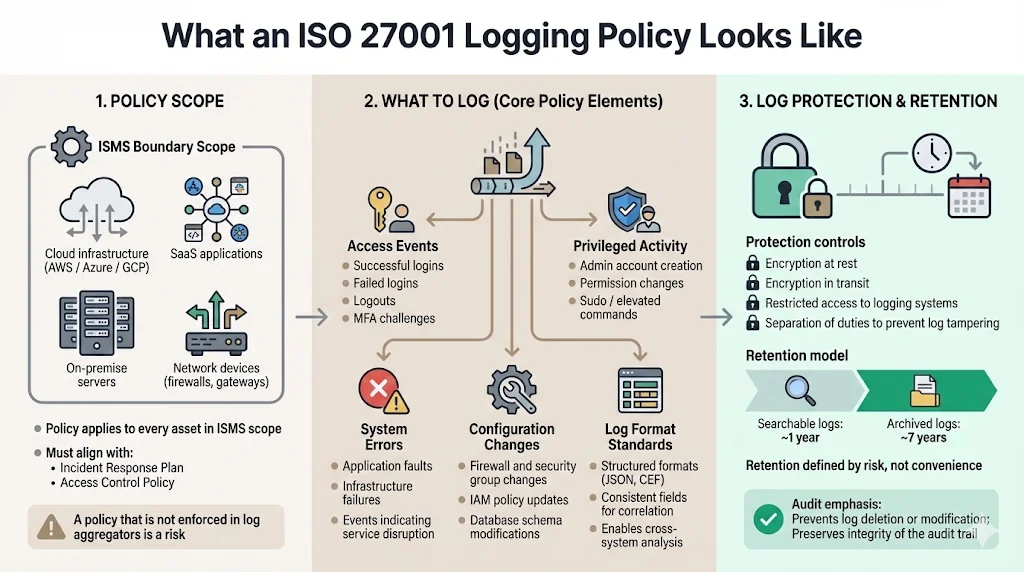
The policy must cover every asset within the ISMS scope, including cloud infrastructure (AWS/Azure/GCP), SaaS applications, on-premise servers, and network devices. It should integrate with your Incident Response Plan and Access Control Policy. A policy that exists only as a PDF is a liability. It must be reflected in the configuration of your log aggregators.
Core Elements of an Effective Policy
An effective policy specifies exactly what to log. This includes:
- Access Events: Successful and failed logins, logouts, and MFA challenges.
- Privileged Activity: Creation of admin accounts, permission changes, and sudo commands.
- System Errors: Faults that could indicate a denial-of-service attack or hardware failure.
- Configuration Changes: Modifications to firewalls, security groups, or database schemas.
The policy also defines standard formats (such as JSON or CEF) to ensure that different systems can be correlated effectively.
Log Protection & Retention
ISO 27001 does not mandate a specific retention period, but it requires that you define one based on risk. For enterprise clients, a common standard is 1 year of searchable logs and 7 years of archived logs. Integrity is managed through encryption at rest and in transit, combined with restricted access to the logging environment itself to prevent "log scrubbing" by attackers.
Anatomy of an ISO 27001 Logging Pipeline
Building the technical components of Logging Pipelines For ISO 27001 involve several stages of data transformation. Each stage must be secured to ensure the final evidence is admissible in an audit.
1) Log Generation
Telemetry starts at the source. Modern stacks generate logs via stdout in containers, syslog on Linux servers, or Event Logs on Windows. For cloud services, this includes AWS CloudTrail or GCP Cloud Audit Logs. The data captured must include a high-resolution timestamp, the source IP, the user ID (not just a username), and the outcome of the event.
2) Log Collection & Transport
Data must move from the source to a central repository. This is achieved through agents (like Fluentbit or Datadog Agent), forwarders (like Logstash), or API-based ingestion. At Konfirmity, we favor agentless ingestion for cloud-native services to reduce the attack surface while utilizing secure, encrypted transport protocols like TLS 1.3 for all data in motion.
3) Log Parsing & Normalization
Raw logs are messy. A sign-in event from a Cisco firewall looks different from a sign-in event in Azure AD. Normalization uses regex or grok patterns to map these disparate events into a common schema. This allows security teams to run a single query—"Show me all failed logins for user
$$X$$
"—across the entire stack.
A logging pipeline built for security makes ISO 27001 evidence collection automatic.
Drop your work email and we'll design a logging pipeline that meets ISO 27001 A.8.15.
4) Storage & Retention Management
Storage is typically tiered.
- Hot Storage: High-speed, indexed data for immediate searching and alerting (e.g., 30–90 days).
- Cold Storage: Compressed, encrypted archives for long-term compliance (e.g., several years). Lifecycle policies must be automated to move data between tiers without human intervention, reducing the risk of accidental deletion.
5) Monitoring, Alerts, and Correlation
The pipeline ends with action. A SIEM (Security Information and Event Management) tool applies correlation rules to the normalized data. For example, if a user logs in from New York and then from London five minutes later, the pipeline triggers an "Impossible Travel" alert. This is the difference between "having logs" and "having security."
Step-by-Step Implementation Guide
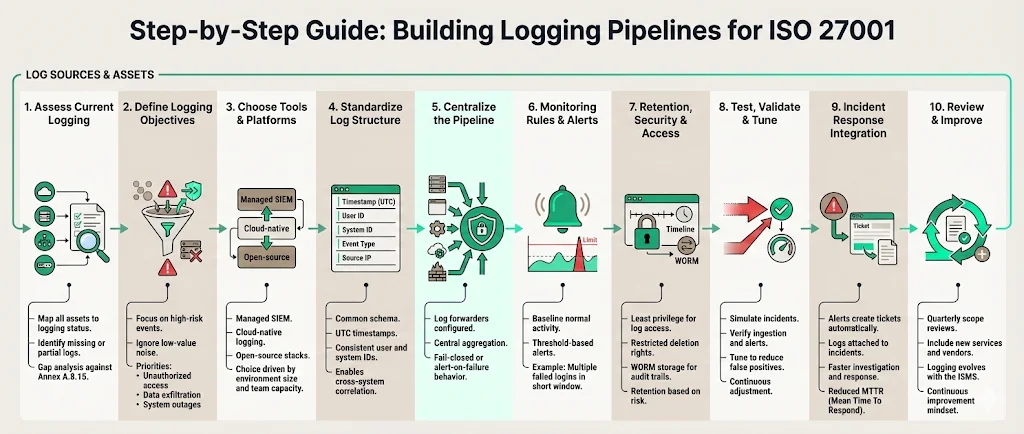
Building Logging Pipelines For ISO 27001 follows a rigorous process. Konfirmity is a security-driven compliance platform; with the fully-managed service, our team executes these steps inside your existing stack rather than asking you to manage a new tool.
Step 1: Assess Current Logging Capabilities
Begin by mapping every asset in your inventory to its current logging state. Are the logs being captured? Are they being sent anywhere? This gap analysis identifies what needs to be fixed to meet Annex A.8.15.
Step 2: Define Logging Objectives
Do not log everything. High-volume, low-value logs (like routine network pings) create noise and inflate storage costs. Focus on threats: unauthorized access, data exfiltration, and system downtime.
Step 3: Choose Tools & Platforms
Decide between a managed SIEM, a cloud-native tool like AWS Security Lake, or an open-source ELK stack. For enterprises, the choice usually depends on the complexity of the environment and the size of the internal security team. Konfirmity provides the expertise to run these tools so your engineers can focus on product development.
Step 4: Standardize Log Data Structure
Implement a common schema. Use UTC for all timestamps to avoid confusion during cross-region incident investigations. Ensure user IDs are consistent across applications and infrastructure.
Step 5: Implement Centralized Pipeline
Configure your log forwarders. Ensure that logging is "fail-closed"—if the logging service goes down, the application should ideally alert the team or stop processing sensitive transactions until monitoring is restored.
Step 6: Set Monitoring Rules & Alerts
Establish baselines for "normal" activity. Create thresholds for alerts: for instance, five failed login attempts in 60 seconds from a single IP should trigger an immediate block or alert.
Step 7: Define Retention, Security, and Access Controls
Apply the principle of least privilege to the log data itself. Only a small group of security administrators should have access to delete or modify log archives. Use WORM (Write Once, Read Many) storage for critical audit trails.
Step 8: Test, Validate, and Tune
Simulate an event, such as an unauthorized login attempt, and verify that it appears in the central repository and triggers the correct alert. Tuning is an ongoing process to reduce false positives.
Step 9: Integrate With Incident Response
Ensure that when an alert triggers, it flows into your ticketing system (Jira, ServiceNow) with all the relevant log data attached. This reduces Mean Time to Recovery (MTTR).
Step 10: Review, Audit, and Improve
Conduct quarterly reviews of your logging scope. As you add new vendors or microservices, update your pipeline to include them. This continuous improvement is the hallmark of a mature ISMS.
Examples & Practical Use Cases
Seeing the benefits of Logging Pipelines For ISO 27001 in action clarifies their value during the procurement process.
Detecting Suspicious Login Patterns
An enterprise client was targeted by a credential stuffing attack. Their centralized pipeline detected 12,000 failed login attempts across 400 accounts in three minutes. According to the 2025 Verizon Data Breach Investigations Report, credential-based attacks remain the top initial access vector, accounting for 22% of all breaches. Because the pipeline was integrated with their WAF, the source IPs were automatically blacklisted before a single account was compromised.
Tracking Admin Activity
During a SOC 2 and ISO 27001 cross-framework audit, the auditor requested proof that only authorized personnel accessed the production database. The pipeline provided a filtered report showing every "sudo" and "db-admin" command executed in the last six months, mapped to specific Jira change-request tickets. This satisfies the "Admin Test" where auditors verify that IT managers cannot delete logs of their own actions.
Supporting Incident Investigations
A healthcare provider suspected an internal data leak. The pipeline allowed investigators to trace the movement of sensitive files through the environment, identifying exactly which employee accessed the records and transferred them to an unauthorized device. The IBM 2025 findings show that malicious insider attacks remain the most expensive threat vector, costing an average of $4.92 million per breach. This evidence was crucial for their HIPAA breach notification obligations.
Tools & Technologies
The technology for Logging Pipelines For ISO 27001 varies based on maturity. Enterprise buyers often look for tools that support automation and high-fidelity alerting.
- SIEM Platforms: Splunk, Sentinel, and IBM QRadar offer advanced correlation but require significant expertise to manage.
- Log Management: Datadog, New Relic, and Sumo Logic are excellent for performance and basic security but can become expensive at scale.
- Managed Services: Konfirmity's platform can be run self-serve, or you can add the fully-managed service. With managed delivery, our team implements the controls inside your stack, utilizing the best tools for your specific environment, and then manages the output. This approach reduces your team's workload from 600 hours a year to under 70 hours of oversight.
Common Pitfalls & Tips to Avoid Them
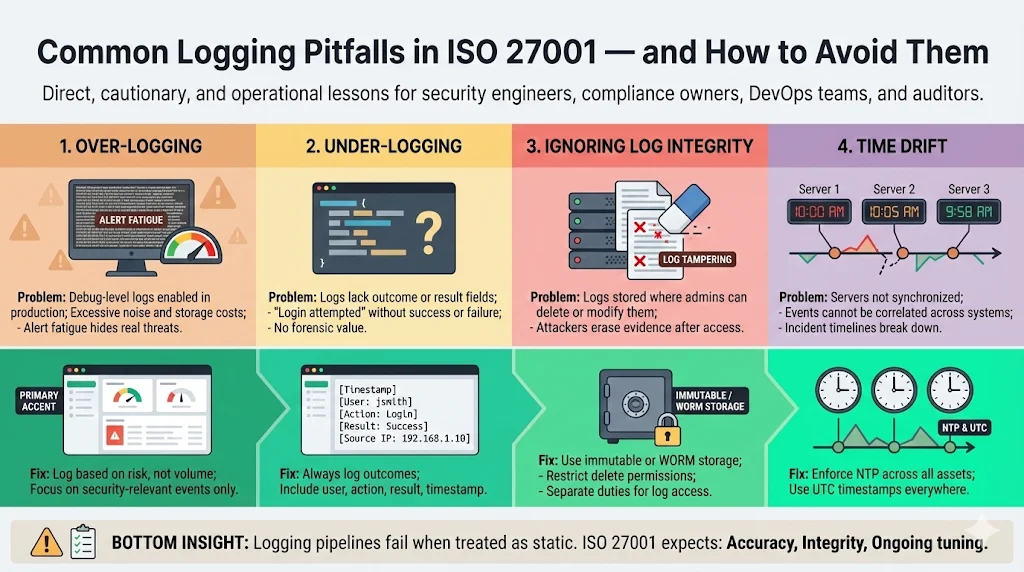
Errors with Logging Pipelines For ISO 27001 often stem from a "set it and forget it" mentality.
- Over-Logging: Capturing debug-level logs in production leads to "alert fatigue" and massive storage bills. Be selective.
- Under-Logging: Missing the "Outcome" field is a common mistake. A log that says "User attempted login" is useless without knowing if they succeeded.
- Ignoring Integrity: If an attacker gains admin access and can delete the logs of their entry, your pipeline has failed. Use immutable storage.
- Time Drift: If your server clocks are not synchronized via NTP, correlating events across multiple systems becomes impossible.
Turn a pile of log files into a real pipeline
Book a demo and we'll show how Konfirmity validates your collection, normalization, retention and alerting so surveillance auditors find complete, trusted logs instead of fragments.
Book a demo
Conclusion
Security that reads well in documents but fails under incident pressure is a liability. Securing Logging Pipelines For ISO 27001 ensures that your organization is not just compliant on paper, but resilient in practice. By treating logging as a continuous operational requirement rather than a check-the-box exercise, you accelerate enterprise sales cycles and build trust with sophisticated buyers.
At Konfirmity, we are a security-driven compliance platform, run self-serve or fully managed. We don’t just advise on how to build these systems; with the fully-managed service, our team executes the implementation and manages the ongoing operations. Build your program once, operate it daily, and let compliance follow as a natural result of good security.
Frequently Asked Questions
It is a formal document defining how your organization captures, protects, monitors, and uses log data to detect issues and prove control effectiveness as part of ISO 27001 compliance. It serves as the operational manual for your security team.
ISO 27001 does not explicitly mandate a SIEM tool. However, it requires centralized logging, analysis, and monitoring. For any organization with more than a few dozen servers, a SIEM or a robust log aggregator is the only practical way to meet these requirements.
The standard does not specify a duration. You must define retention based on your risk profile, legal obligations (like GDPR or HIPAA), and business needs. Most enterprises settle on 12 months for active logs.
Logging provides visibility into system activity, supports incident detection, aids in risk assessment, and provides the audit trails needed to show that your security controls are operating effectively over time.