

Most large clients ask for security assurance before they sign contracts. They no longer accept marketing claims or a single clean report; they want proof that a vendor is operating controls day in and day out. In this context, SOC 2 Logging And Monitoring is a critical theme. SOC 2 is an attestation framework maintained by the American Institute of Certified Public Accountants (AICPA) that measures how well service organisations protect information under five trust services criteria: security, availability, processing integrity, confidentiality and privacy. Logs and monitoring supply continuous evidence that controls are working. Without them, a Type II report becomes very hard because auditors test control effectiveness over months rather than a single snapshot.
The cost of poor incident detection makes this urgency clear. IBM’s 2025 cost of data breach report shows the global average breach cost dropping to USD 4.44 million, yet breaches in the United States average USD 10.22 million, reflecting higher penalties and slower detection. The same report notes that 97 percent of AI‑related breaches happened in organisations lacking proper access controls. Weak logging and monitoring delay detection and inflate costs. Conversely, strong evidence streams reduce time to find and contain incidents and build trust during procurement.
This article explains what SOC 2 means for logging and monitoring, maps core principles, outlines a practical build strategy, calls out common mistakes and links good logging to enterprise risk. It draws from authoritative sources (NIST publications, an industry trust services criteria overview, IBM’s breach research and Konfirmity’s delivery work) and from more than 6,000 security audits completed by Konfirmity over 25 years. Throughout, we assume the viewpoint of a practitioner implementing SOC 2 programmes, not just advising. The primary objective is to show how to build controls that withstand audits, serve clients and withstand attacks.
What SOC 2 Means for Logging and Monitoring
Understanding the framework
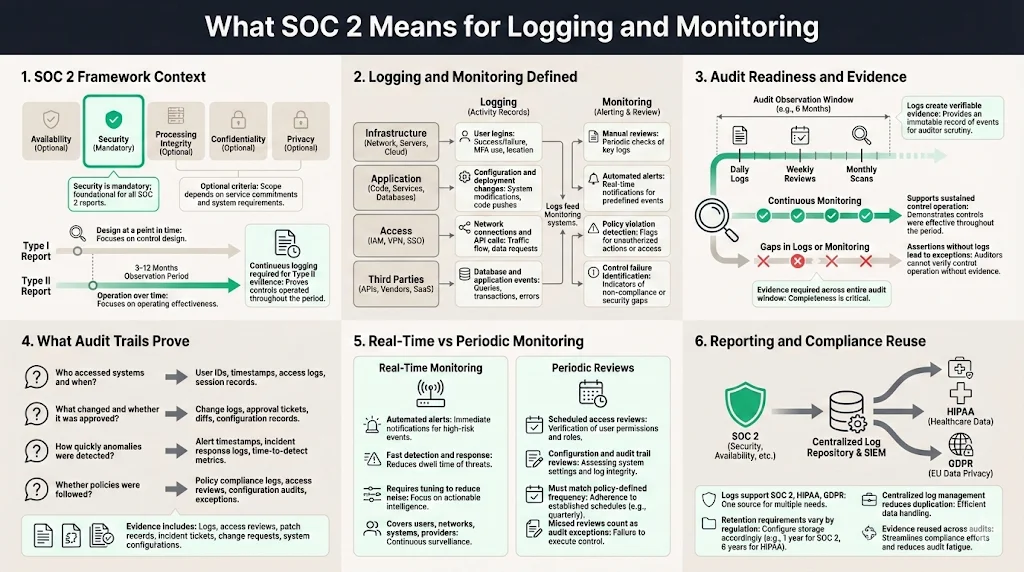
SOC 2 reports assess controls that address five trust services criteria. Security is mandatory; the other four criteria—availability, processing integrity, confidentiality and privacy—are added when a service organisation’s commitments extend into those areas. Security covers logical and physical access, system operation, change management and risk mitigation. Availability deals with uptime and disaster recovery. Processing integrity focuses on correct, authorised and timely processing of data. Confidentiality controls ensure that sensitive business information is protected through classification and restricted access. Privacy controls ensure personal data is collected, used and disposed of according to stated commitments.
A Type I report describes whether controls are designed and in place at a point in time. A Type II report tests whether controls operate effectively over a defined observation period—typically three to twelve months. Buyers prefer Type II because it demonstrates sustained operations. Continuous logging and monitoring are vital to collect evidence across that period. Without evidence, control activities become assertions rather than facts, and auditors will flag exceptions.
Logging and monitoring defined
In the SOC 2 context, logging means capturing records of system events—user logins, configuration changes, network connections, API calls, database queries and application events. Monitoring means reviewing those records to detect unusual activity, policy violations or control failures. Monitoring may be manual (periodic reviews by analysts) or automated (alerts from a security information and event management platform). It occurs at multiple layers: infrastructure, application, access control and third‑party services.
Audit readiness and evidence
Logs create an audit trail. NIST’s incident response guidance emphasises that log records must be generated and made available for continuous monitoring. Logs are “particularly important for recording and preserving information that is vital to incident detection, response and recovery”. The AICPA’s updated SOC 2 description criteria also stress that management must disclose its risk assessment process, principal service commitments and how they inform control design. Continuous monitoring, access reviews and change‑management records prove control operation over time.
Audit trails answer questions such as:
-
Who accessed a system and what did they do? User activity logs provide accountability.
-
What changed in the environment and was it authorised? Configuration and deployment logs show change approvals.
-
Were anomalies detected promptly? Security event logs reveal detection and response timelines.
-
Did the organisation follow its own policies? Evidence such as access review records, patch schedules and incident tickets support claims.
For SOC 2 Type II, auditors expect continuous evidence across the audit window. Failure to retain or produce logs can result in qualified opinions or exceptions.
Real‑time versus periodic review
Monitoring can be real‑time or periodic. Real‑time monitoring uses streaming logs, correlation engines and automated alerts to detect suspicious patterns quickly. NIST’s continuous monitoring guidance stresses tuning to reduce false positives and negatives, covering network traffic, physical access, user activity and provider services. Real‑time monitoring enables incident response teams to triage and remediate threats before they spread.
Periodic reviews still matter. Access reviews, configuration baselines and quarterly audit trail reviews confirm that controls remain effective. Auditors will ask for evidence that these reviews happen at the frequency defined in policies. Missing a quarterly access review or patch cycle can be considered an exception. Combining real‑time monitoring with scheduled reviews balances operational agility with discipline.
Reporting and compliance
Logs also serve compliance reporting. Privacy regulations (such as HIPAA and GDPR) require organisations to document who accessed personal information and why. In regulated sectors, logs must be retained for specific periods—for example, HIPAA requires keeping records for at least six years. The NIST log management project emphasises the planning aspect: revision 1 of SP 800‑92 provides a playbook to help organisations plan log management improvements. By aligning logs with risk assessments and regulatory requirements, organisations can reuse evidence across frameworks and reduce duplication.
Core Principles of SOC 2 Logging and Monitoring
Below are the core ideas that enterprise buyers care about. Each principle connects to a set of controls and evidence requirements.
Audit trail and log management
-
What to capture – A robust audit trail includes operating system events, application logs, database transactions, access control decisions, API calls and network flows. For cloud workloads, include identity provider logs, infrastructure‑as‑code changes and service‑to‑service calls. Logging deployment pipelines ensures code changes are reviewed and approved.
-
Retention and tamper resistance – Define retention periods based on regulatory requirements and incident investigation needs. Many teams retain security logs for at least twelve months; some industries keep them for seven years. Store logs in write‑once media or append‑only storage, and hash logs to detect tampering. Use a centralised repository to prevent loss and enable search.
-
Planning – The NIST log management project states that the new SP 800‑92 revision 1 aims to help organisations improve log management planning so they have the log data they need. It focuses on high‑level guidance for organisation‑wide improvements rather than implementation details. Planning should identify log sources, assign ownership, define retention and align with risk assessments.
Security events and incident detection
-
Suspicious behaviour – Monitor for failed login attempts, unusual authentication patterns (e.g., a user logging in from two countries within minutes), privilege escalation, disabled logging attempts, configuration changes outside change windows and traffic to command‑and‑control domains.
-
Evidence for investigations – When an incident occurs, logs provide a timeline. NIST emphasises that logs are vital for detection and recovery. Without granular logs, investigators cannot determine the scope of a breach or whether data was exfiltrated.
-
Integrated alerts – Set thresholds and baseline deviations that trigger automated alerts. Tune rules to minimise noise. Real incidents often hide within thousands of benign events; correlation engines (see section 3.6) help group related events.
User activity tracking and access controls
User activity logging supports access control requirements. Track authentication, authorisation changes, privilege grants and revocations, and resource usage. Pair logs with an identity and access management system that supports multi‑factor authentication and least‑privilege. The updated SOC 2 guidance emphasises that modern access controls and network segmentation are expected. Logs should tie actions to human or service identities so auditors can verify that access was appropriate. Scheduled access reviews compare log entries with role definitions and help detect dormant accounts.
Monitoring tools and real‑time monitoring
Monitoring platforms, such as security information and event management (SIEM) or extended detection and response (XDR) systems, aggregate and analyse log data across sources. Dashboards display metrics and alerts. Real‑time monitoring relies on streaming ingestion, correlation and analytics to spot anomalies quickly. NIST’s continuous monitoring profile recommends monitoring networks, physical environments, personnel activity, technology usage and external service provider activities. Organisations should deploy monitoring on cloud infrastructure, on‑premises networks, SaaS platforms and endpoints.
Real‑time monitoring does not remove the need for human oversight. Analysts review alerts, investigate events and adjust detection rules. Tools should support both automated and manual workflows, with case management to document investigations and outcomes.
Automated alerts and system alerts
Automatic alerts accelerate detection and response. Configure alerts for high‑risk events: multiple failed logins, privilege escalations, abnormal data transfers, disabled logging, critical file changes and suspicious network connections. Use baselines to detect deviations from normal behaviour and avoid false positives. The NIST profile recommends tuning monitoring technologies to reduce false positives and negatives. Too many alerts cause fatigue; too few miss attacks.
Alerts should integrate with incident response workflows. When a threshold is crossed, the system should create a ticket, assign severity and notify the right people. Response teams should have runbooks for common alerts so they can act quickly. For example, repeated failed logins may trigger an account lock and require the user to reset credentials.
Event correlation
Event correlation combines data from different logs to identify patterns that indicate an attack. For instance, correlating a successful VPN login from an unusual location with subsequent access to sensitive data and a configuration change can reveal account compromise. Correlation rules link events by user, host, IP address or timestamp. Advanced systems use statistical models and behavioural analytics to group related events and assign risk scores.
Without correlation, analysts must review disparate logs manually, which is slow and error‑prone. Correlation also enables detection of sophisticated threats that manifest as low‑severity events across multiple systems. For SOC 2, correlated events demonstrate that the monitoring system can detect complex attack chains and support incident response.
Compliance standards and vulnerability management
Logging and monitoring underpin broader compliance. SOC 2 intersects with HIPAA, GDPR and ISO 27001. Organisations must map logs to risk assessments and vulnerability findings. For example, NIST’s SP 800‑61 guidance ties continuous monitoring to detecting deviations from expected activity and changes in security posture. Vulnerability management processes should log scanning results, remediation status and exception approvals. One 2026 requirements article notes that effective SOC 2 programmes include regular vulnerability management and patching.
Data integrity
Logs must themselves be trustworthy. Ensure accuracy by synchronising system clocks via Network Time Protocol (NTP) or equivalent. Protect log integrity by hashing logs, using write‑once storage or immutable object stores. Restrict who can modify or delete logs; assign separate roles for log collection, storage and analysis. Regularly verify that logs have not been altered by comparing hashes or signatures. When using third‑party logging providers, review their security and availability commitments.
Key Steps to Build a SOC 2‑Ready Logging and Monitoring System
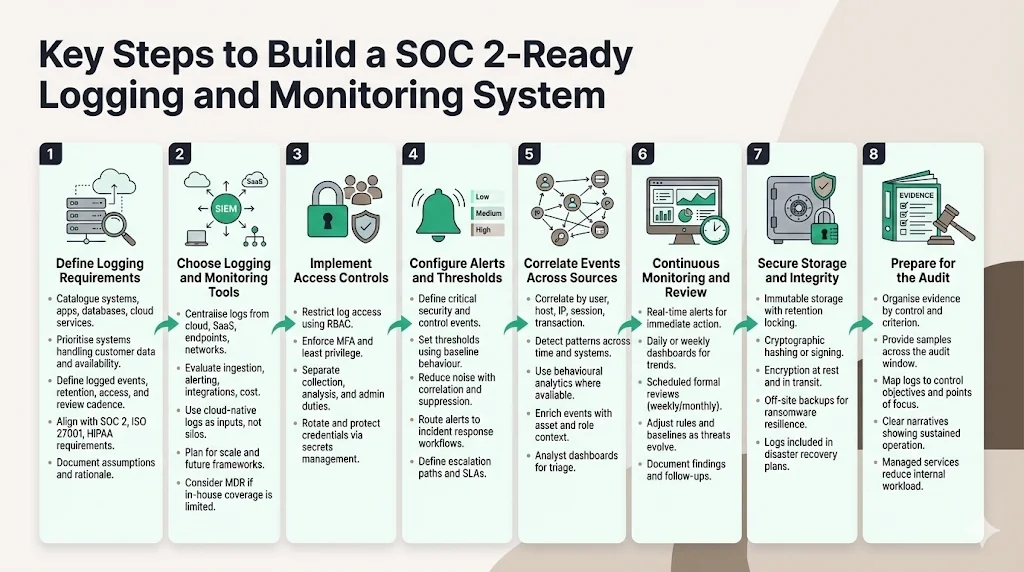
This section provides a practical, step‑by‑step plan for enterprise teams. The numbers given here reflect Konfirmity’s delivery experience: on average, we can prepare teams for a Type II audit in 4–5 months with about 75 internal hours, whereas self‑managed approaches often take 9–12 months and 550–600 hours. For each step, we explain what needs to happen and where a managed service adds value.
Build logging that satisfies auditors and actually detects threats.
Drop your work email and we'll turn your log stack into audit-ready evidence.
Step 1: Define logging requirements
-
Scope log sources – Catalogue systems, applications, databases, cloud services and endpoints. Identify sensitive data and compliance obligations. Prioritise logging for systems that process customer data, impact availability or handle authentication.
-
Establish policies – Define what events to log, retention periods, access restrictions and review frequencies. Align with trust services criteria and industry regulations. For example, maintain infrastructure and application logs for at least twelve months and keep privacy‑related logs longer if required by law.
-
Integrate with existing frameworks – If you operate an Information Security Management System (ISMS) under ISO 27001, reuse risk assessments and asset inventories to guide logging. For HIPAA, ensure audit logs meet the six‑year retention rule. Document assumptions and rationale in your policies.
Step 2: Choose logging and monitoring tools
-
Centralise logs – Use a SIEM or log analytics platform to collect logs from cloud providers, container platforms, operating systems, SaaS applications and network devices. Centralisation enables correlation, search and retention control.
-
Evaluate tools – Compare features such as ingestion scalability, query capabilities, alerting, integrations and cost. Consider managed detection and response (MDR) services if you lack in‑house analysts. UnderDefense’s comparison of in‑house and outsourced monitoring highlights the high cost of building 24/7 coverage internally. Outsourcing can provide expertise and reduce noise.
-
Assess cloud provider offerings – Many cloud platforms offer native logging and monitoring (e.g., AWS CloudTrail, Azure Monitor). Use them as log sources, but export data to your SIEM for unified analysis. Confirm that logs capture API calls, identity activities and network events.
-
Plan for growth – Tools should handle increased volume, new services and additional frameworks. Evaluate pricing models (by data volume, node count or events per second) and forecast future costs.
Step 3: Implement access controls
-
Limit access to logs – Only authorised personnel should view, modify or delete logs. Use role‑based access control (RBAC) in the logging platform. Enforce multi‑factor authentication and least‑privilege principles.
-
Separate duties – Assign log collection, analysis and administration to different individuals or teams. This reduces insider risks and improves oversight.
-
Protect credentials – Rotate API keys and service account credentials. Use secrets management solutions to store credentials used by log shippers and monitoring tools.
Step 4: Configure alerts and thresholds
-
Define events of interest – Identify critical events (e.g., failed admin logins, disabled logging, unusual data transfers, configuration changes outside change windows). For each event type, define severity and response procedures.
-
Set thresholds – Use baselines from normal behaviour to set thresholds. For example, trigger an alert if failed login attempts exceed a specified number in a short time or if a user accesses an excessive amount of data.
-
Reduce noise – Tune alert rules to minimise false positives. Combine multiple conditions (e.g., failed logins from new IP plus access to sensitive systems) to raise confidence. Include suppression windows to avoid duplicate alerts.
-
Integrate with incident response – Send alerts to a ticketing system or incident response platform. Define escalation paths and service‑level agreements (SLAs) for response.
Step 5: Correlate events across sources
-
Create correlation rules – Define rules that link related events by user, host, IP address, session or transaction ID. For example, link an authentication event with subsequent privilege escalations and data access.
-
Use advanced analytics – Implement behavioural analytics or machine learning modules (available in some SIEMs) to detect anomalies across multiple data streams. Monitor for patterns that span time or systems, such as slow exfiltration or lateral movement.
-
Enhance context – Enrich events with metadata (e.g., asset criticality, user role, geolocation) to improve triage. Build dashboards that summarise correlated alerts for analysts.
Step 6: Continuous monitoring and review
-
Daily or weekly dashboards – Analysts should review dashboards and alerts regularly. Real‑time alerts prompt immediate action; dashboards show trends, such as increases in failed logins or unusual traffic.
-
Scheduled reviews – Perform formal reviews of logs, alerts and control performance at defined intervals (e.g., weekly or monthly). Verify that detection rules still cover evolving threats and adjust baselines accordingly.
-
Assess gaps – Use review findings to refine logging scope, adjust alert thresholds and improve incident response. Document follow‑up actions.
-
Retain evidence – Maintain logs and review records to support audits. Provide auditors with logs, review reports and incident tickets that map to trust services criteria and points of focus.
Step 7: Maintain secure storage and integrity
-
Use immutable storage – Store logs in a repository that prevents modification or deletion. Cloud object storage with versioning and retention locking can meet this requirement.
-
Hash or sign logs – Generate cryptographic hashes or signatures for log files when they are stored. Periodically verify hashes to detect tampering.
-
Encrypt data at rest and in transit – Protect log data when stored and during transmission. Use TLS for log shipping and encryption for storage.
-
Backup logs – Maintain off‑site backups of logs to protect against ransomware and accidental deletion. Include logs in disaster recovery plans.
Step 8: Prepare for the audit
-
Organise evidence – Group logs and documentation by control. For each trust service criterion, assemble policies, procedures, logs, review records and reports. Provide a narrative explaining how controls operate.
-
Provide samples – Auditors may request samples of logs and evidence across the audit window. Prepare to export queries or dashboards showing continuous control operation.
-
Map controls – Align logs with control objectives and points of focus. For example, show how access logs support logical access controls and how incident tickets reflect timely response.
-
Use a managed service – Konfirmity’s managed service assigns dedicated experts who collect evidence, organise documentation and guide teams through the audit. This reduces internal workload and increases audit readiness.
Common Pitfalls and How to Avoid Them
-
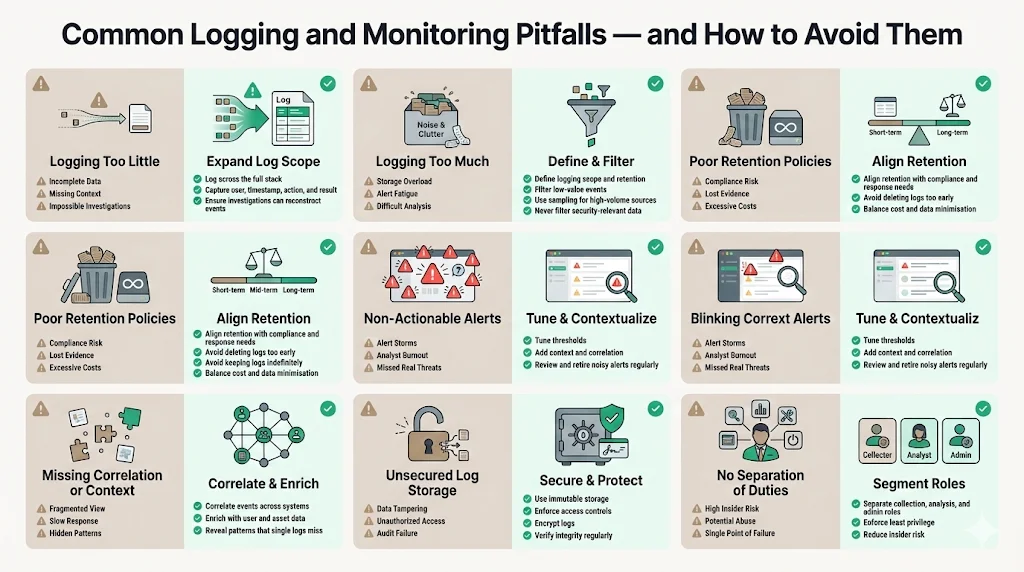
Logging too little – Some teams log only critical events. Without contextual logs, investigations stall. Capture events across the stack and ensure logs contain enough detail (user, timestamp, action, result) to reconstruct actions.
-
Logging too much – Excessive logging can overwhelm storage and analysts. Define scope and retention; filter out low‑value events. Use sampling for high‑volume sources such as web access logs, but avoid filtering security‑relevant information.
-
Poor retention policies – Deleting logs too soon violates regulations and prevents incident investigation. Keeping logs forever is costly and may violate data minimisation rules. Align retention with compliance needs and incident response requirements.
-
Non‑actionable alerts – Alerts that fire too often or lack context cause fatigue. Tune thresholds, use correlation and enrich alerts. Regularly review alert definitions and retire ones that no longer provide value.
-
Missing correlation or context – Failing to correlate events hides attack patterns. Use a SIEM to link events across systems and enrich them with user and asset data.
-
Unsecured log storage – Storing logs on unsecured servers invites tampering. Use immutable storage, access controls and encryption. Regularly verify log integrity.
-
No separation of duties – When one person can collect, modify and delete logs, insider threats increase. Separate roles and enforce least‑privilege access.
How Logging and Monitoring Support Enterprise Risk
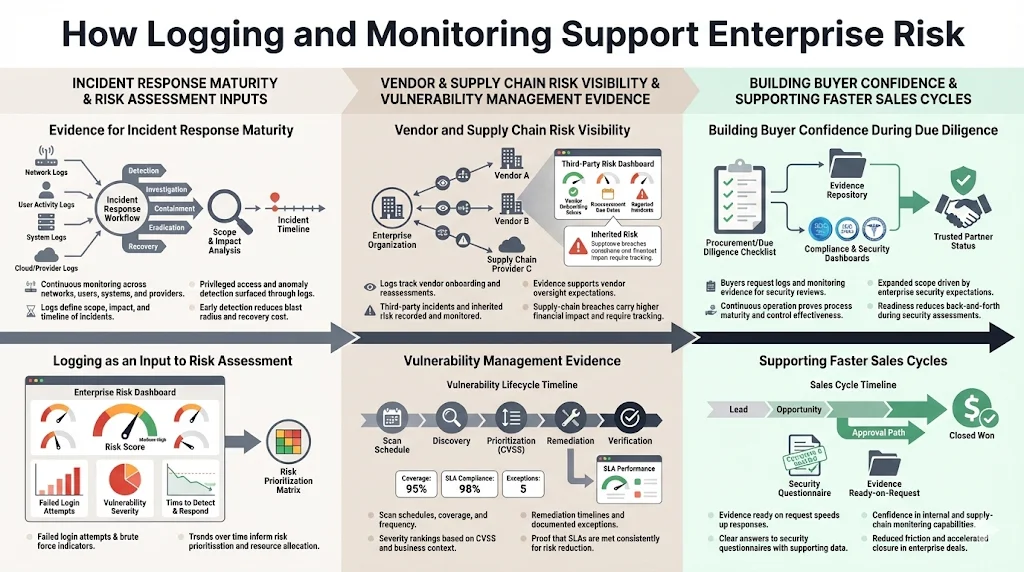
Evidence for incident response maturity
Incident response depends on timely detection and accurate information. NIST’s incident response profile states that continuous monitoring should watch networks, personnel activity, physical environments and external providers for anomalies. Logs provide the facts needed to determine scope and impact. In the IBM breach analysis, shadow AI and poor access controls contributed to 97 percent of AI‑related breaches. Logs showing privileged access misuse would help detect such incidents earlier.
Role in risk assessment and vulnerability mitigation
Logging data feeds risk assessments. Metrics such as the number of failed login attempts, unpatched vulnerabilities and time to detect incidents inform risk models. Recorded Future and other analysts note that supply‑chain breaches cost around USD 5.08 million, about 40 percent more than internal breaches. Vendor risk management programmes should log onboarding reviews, third‑party incidents and monitoring results to track inherited risk. Many enterprise buyers now expect controls covering vendor onboarding, periodic reassessment, contract terms and incident coordination.
Vulnerability management logs show scanning schedules, severity rankings (e.g., CVSS scores), remediation timelines and exceptions. These logs demonstrate that vulnerabilities are identified and addressed within defined SLAs.
Building confidence during due diligence
Strong logging and monitoring signal operational maturity during procurement. Buyers often request logs, incident tickets and evidence of continuous monitoring as part of security questionnaires. The SOC benchmark study cited by Konfirmity shows that confidentiality appears in 64.4 percent of reports and availability in 75.3 percent, indicating expanding scope driven by client expectations.
Moreover, recorded studies show that half of companies now work with more than 100 vendors. Buyers want assurance that vendors can monitor not only their own systems but also their supply chain. Providing well‑maintained logs and dashboards helps build trust and accelerate sales cycles. In our experience, companies working with Konfirmity can reduce sales cycle friction, as compliance questions are answered promptly and evidence is ready.
Build logging that detects incidents and survives review
Book a demo and we'll show how Konfirmity ties your log sources, alert thresholds and review records to the criteria an auditor tests, instead of leaving a trail of screenshots.
Book a demo
Conclusion
SOC 2 logging and monitoring are more than checkboxes; they are evidence streams that prove controls work and build trust with clients. Logs capture who did what, when and why. Monitoring turns logs into insight through real‑time detection, automated alerts, correlation and regular reviews. NIST emphasises that logs are vital for incident detection and recovery and that continuous monitoring should cover networks, physical environments, personnel activity and external providers.
An effective SOC 2 logging programme starts with scoping and policies, uses centralised tools, implements strict access controls, tunes alerts, correlates events, reviews regularly, protects log integrity and organises evidence for audit. Avoid common mistakes such as logging too little, keeping logs in unsecured storage or generating floods of useless alerts. Link logs to risk assessments, vendor oversight and vulnerability management.
Finally, treat logging and monitoring as ongoing operations. Controls must function every day, not just during audits. This is where a human‑led managed service pays off. Konfirmity’s experts implement controls inside your stack, collect evidence all year and guide you through audits. By focusing on security first, compliance follows naturally. That is the path to winning enterprise clients and maintaining trust.
FAQ
SOC 2 reports assess controls against five trust services criteria defined by the AICPA. The criteria are: Security, which protects information from unauthorized access; Availability, which ensures systems are reliable for use; Processing Integrity, which verifies systems operate as intended; Confidentiality, which limits access to business information; and Privacy, which protects personal data. Security is mandatory for all SOC 2 reports; the other criteria are added based on service commitments.
SOC 2 logging requirements involve capturing system, application, access and configuration events; retaining logs for defined periods; ensuring logs are tamper‑resistant; and monitoring them for anomalies. NIST guidance emphasises that log records must be generated and made available for continuous monitoring and are vital for incident detection and recovery. Centralised logging and SIEM platforms help collect and analyse logs. Auditors will expect evidence that logs support control objectives and that reviews occur according to policy.
SOC 2 is not mandated by law. It is an attestation framework developed by the AICPA. However, many enterprise clients and regulated sectors require vendors to provide a SOC 2 report as a condition of doing business. The framework aligns with other regulations such as HIPAA and GDPR, and a SOC 2 report can support contractual or regulatory obligations.
SOC 2 stands for “Service Organization Control 2.” It is a reporting framework for examining controls at service organisations relevant to security, availability, processing integrity, confidentiality and privacy. A SOC 2 report provides assurance to clients that a vendor manages risks and protects data appropriately.







