
Most enterprise healthcare buyers ask for security evidence before they sign. Without operational controls and continuous proof, deals stall even when a team believes it is ready on paper. When healthcare organizations move workloads to a cloud provider, protected health information (PHI) brings strict regulatory demands. HIPAA cloud compliance on GCP takes more than checking a box on a vendor form. It needs durable control design, continuous monitoring, and evidence that survives an audit. This walkthrough shows how to configure Google Cloud Platform to meet Department of Health and Human Services (HHS) requirements, with copy-ready templates and a clear blueprint for building controls inside your stack. The goal is less audit friction and faster procurement.
What Is HIPAA Cloud Compliance On GCP?
The Health Insurance Portability and Accountability Act sets strict standards for protecting sensitive patient data. For engineering and security teams, the regulation divides into three primary pillars. The Privacy Rule dictates who has permission to view or use electronic protected health information (ePHI). The Security Rule requires specific administrative, physical, and technical safeguards to protect ePHI from unauthorized access, alteration, or deletion. The Breach Notification Rule sets reporting protocols and timelines if a compromise occurs.
Applied to cloud infrastructure, these rules shift from physical server locks to identity perimeters, encryption protocols, and configuration management. The HHS Office for Civil Rights (OCR) continues to issue multi-million-dollar penalties for basic failures in these areas. Breaches in this sector are expensive: IBM's Cost of a Data Breach Report places the average healthcare incident at about 7.42 million dollars, consistently the most costly of any industry. Paper policies offer no protection against a real-world incident.
Why Cloud Security Is Different
Moving from on-premises servers to Google Cloud Platform changes how regulated data handling is managed. In an on-premises data center, your organization owns the entire stack, from the concrete building to the application logic. In the cloud, you operate under a shared responsibility model.
Google secures the underlying infrastructure. It manages physical data center access, server hardware, and the hypervisor layer. Your organization remains entirely responsible for securing the data you put into the cloud. You control identity and access management (IAM), data encryption configurations, firewall rules, and application-layer security. A misconfigured storage bucket that exposes ePHI is the fault of the healthcare organization, not the infrastructure provider. The same shared responsibility model applies across clouds. If you run parallel workloads elsewhere, our companion guide to HIPAA cloud compliance on AWS covers the equivalent AWS controls.
Understanding the GCP Role in Regulatory Requirements
GCP Is HIPAA-Capable, Not Automatically Compliant
A common misconception among engineering teams is that using a major cloud provider automatically satisfies regulatory requirements. GCP is HIPAA-capable, meaning it provides the tools and infrastructure needed to build a compliant environment. It is not compliant out of the box.
You must actively configure these services. Cloud provider responsibilities end at the infrastructure tier. Customer responsibilities include enforcing least-privilege access controls, maintaining immutable audit trails, managing encryption materials, and conducting annual risk assessments. If you provision a database and leave the access ports open to the public internet, Google will stop nothing, and you will violate federal regulations.
Business Associate Agreement (BAA) with Google
Before any ePHI touches a Google server, you must sign a Business Associate Agreement (BAA). A BAA is a legally binding contract confirming Google's role as a business associate. It dictates how Google will handle and protect the ePHI you store on its systems. HHS explains the required contract terms in its guidance on business associate agreements.
The Google Cloud BAA covers the specific services Google permits for ePHI processing. It does not cover your configurations, your workforce training, or your application code. You can review the platform commitments on the Google Cloud HIPAA compliance page. Operating without a signed BAA is a direct violation of federal law, regardless of how secure your technical configurations might be.
Core Security Safeguards on Google Cloud
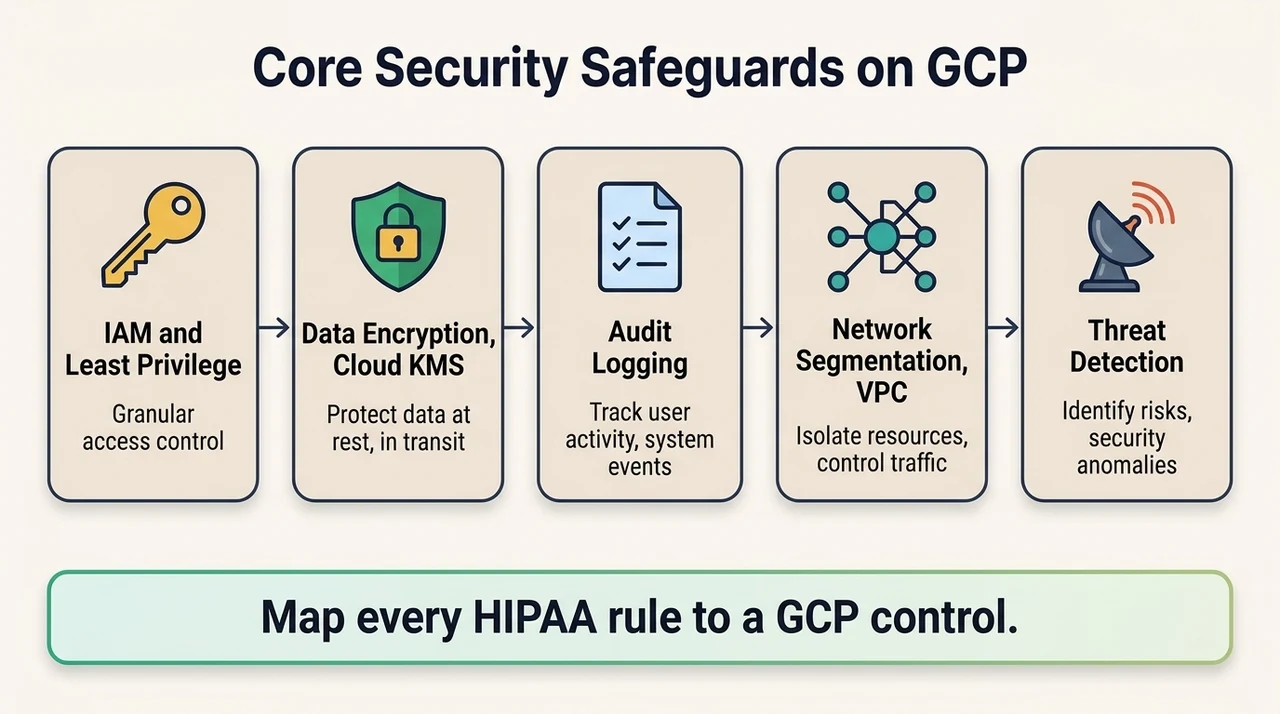
Implementing controls inside your stack means mapping federal regulations to specific GCP services. Following the NIST SP 800-66r2 guidance gives you a structured way to do that mapping.
Access Controls and Identity Management
Identity is the new perimeter. GCP's identity access management (IAM) model determines who can touch ePHI, so configuring IAM roles and permissions requires a strict commitment to the principle of least privilege. Users and services should hold only the exact permissions needed to do their specific tasks. Grounding this in a formal role-based access control for HIPAA model keeps permissions tied to job function rather than to individuals.
Security teams must enforce multi-factor authentication (MFA) for every human user accessing the console. Service accounts, which applications use to interact with GCP resources, require equal scrutiny. Rotate service account credentials frequently and restrict their usage tightly to specific IP ranges or virtual private clouds (VPCs). Treat these access controls as living configuration, reviewed on a schedule rather than set once.
Data Encryption
The Security Rule requires protecting ePHI from unauthorized viewing, and data encryption is the control that delivers it. On GCP, encryption of data at rest is enabled by default using AES-256. Relying only on Google-managed encryption is often insufficient for strict enterprise requirements.
Teams should implement customer-managed cryptographic materials using Cloud KMS. This gives you complete control over the rotation schedule and the ability to revoke access to data instantly by destroying the cryptographic keys. All data in transit must also be encrypted using TLS 1.2 or higher, so that data moving between your application and the database stays safe from interception. For the full pattern, see our guides to encryption at rest and in transit and key management best practices.
Audit Trails and Logging
Evidence collection is critical. When auditors arrive, you must prove who accessed what data and when. Enabling Cloud Audit Logs tracks access to ePHI across your infrastructure. You must capture Admin Activity logs, which record configuration changes, and Data Access logs, which record when users read or modify data.
Retention demands careful storage planning. Federal guidelines and audit expectations often require keeping audit logs for up to six years. Storing six years of high-volume logs in standard storage is cost-prohibitive, so configure log sinks to route audit data to secure, long-term storage such as BigQuery or Coldline Cloud Storage, where it stays immutable and searchable. Our guide to HIPAA logging and monitoring covers the routing patterns in more detail.
Network Security and Segmentation
Isolating ePHI workloads from less sensitive workloads reduces your attack surface, a discipline that gets harder as you scale into multi-region architectures or break monoliths apart into microservices. Use Virtual Private Cloud (VPC) networks for network segmentation across your architecture. Implement strict firewall rules that deny all inbound traffic by default and open only the specific ports required for a service.
Deploy VPC Service Controls to create a secure perimeter around your GCP resources. This prevents data exfiltration by blocking authorized users from moving ePHI to unauthorized external resources or personal storage buckets.
Monitoring, Threat Detection, and Incident Response
Continuous monitoring catches misconfigurations before they become breaches. Use Security Command Center to gain visibility into your security posture. It scans your environment for vulnerabilities, misconfigured firewalls, and public storage buckets.
Set up alerts for suspicious events, such as a sudden spike in data download volume or a login attempt from an unusual geographic location. Your incident response planning must include automated playbooks that trigger when these alerts fire, isolating compromised virtual machines and notifying your security operations center immediately.
Configuring GCP for HIPAA is where most healthcare deals stall.
Drop your work email and we'll map your GCP stack to HIPAA controls and get you audit-ready.
Step-by-Step Walkthrough for HIPAA Cloud Compliance On GCP
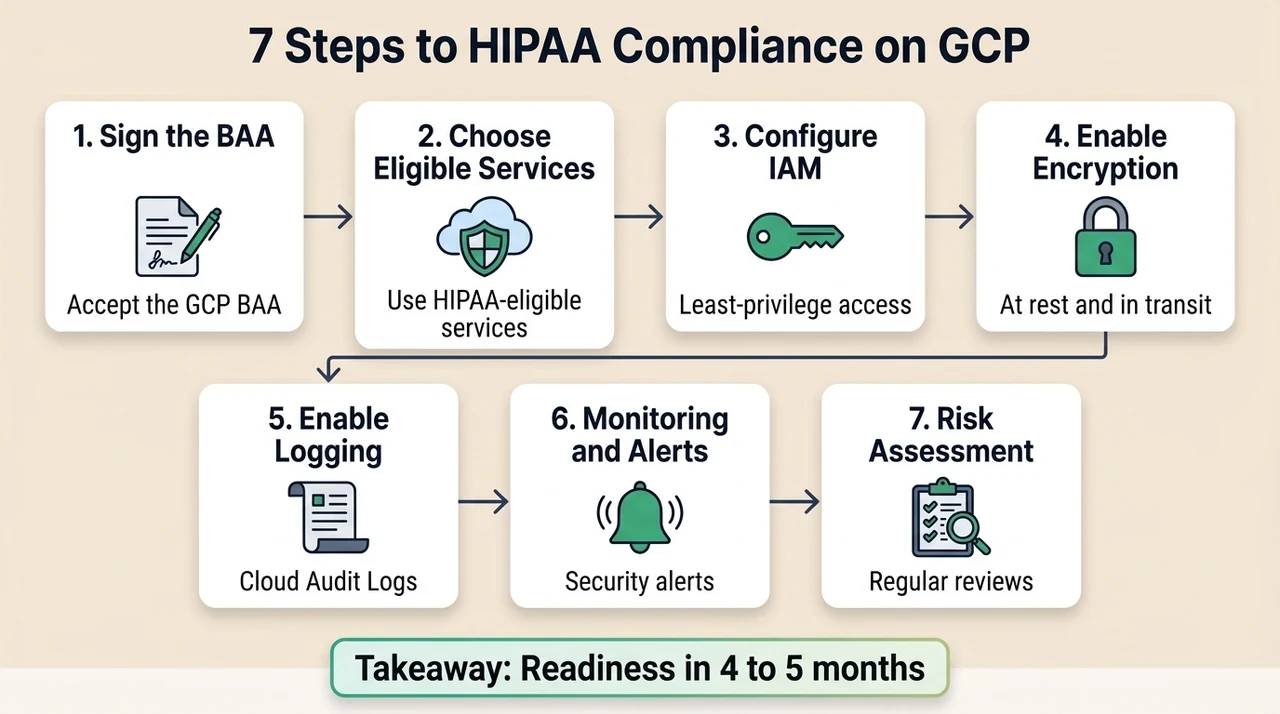
Translating requirements into engineering tasks requires a precise execution plan. Konfirmity is a security-driven compliance platform: run it self-serve, or add the fully-managed service and our experts execute the plan for you, not just advising. Teams that add the fully-managed service reach SOC 2 Type II and HIPAA readiness in four to five months, compared with the nine to twelve months typical of self-managed efforts. Here is the practical step sequence for building controls inside your stack.
Step 1: Sign the BAA
Before provisioning any resources, execute the BAA with Google.
- Access the GCP Console as an Organization Administrator.
- Manage your billing account and locate the legal agreements section.
- Review the BAA terms.
- Execute the document electronically.
- Store the executed BAA in your compliance repository as future audit evidence.
Step 2: Choose Eligible GCP Services
Use only services covered under Google's BAA for processing ePHI.
- Review the official Google Cloud BAA covered services list.
- Verify that your intended architecture relies only on approved services (for example, Compute Engine, Cloud SQL, Cloud Storage, and BigQuery).
- Document the approved services in your internal architecture guidelines.
- Configure organization policies to block deployment of non-covered services.
Step 3: Configure IAM and Access Controls
Precise access controls are a central component of HIPAA cloud compliance on GCP. Avoid primitive roles like Owner or Editor.
- Audit all existing users and service accounts.
- Implement custom IAM roles designed for specific job functions.
- Enforce MFA for all console access using Google Workspace or Cloud Identity.
- Schedule quarterly access reviews to remove stale accounts and revoke unnecessary privileges.
Step 4: Enable Encryption and Cryptographic Management
Configure your environment to manage its own cryptographic materials.
- Create a dedicated project for Cloud KMS to isolate cryptographic management from application workloads.
- Generate customer-managed cryptographic keys.
- Set an automated rotation schedule (for example, every 90 days).
- Bind these cryptographic resources to your Cloud Storage buckets and Cloud SQL instances.
Step 5: Enable Logging, Auditing, and Retention
Design a log routing architecture that meets the six-year retention expectation.
- Enable Data Access audit logs for all services handling ePHI.
- Create an aggregated log sink at the Organization or Folder tier.
- Route all audit logs to a dedicated, restricted BigQuery dataset.
- Configure object lifecycle management on your storage buckets to move older logs to Archive storage, cutting cost while maintaining compliance.
Step 6: Set Up Monitoring and Alerts
Establish continuous monitoring to detect anomalies in real time.
- Activate Security Command Center Premium.
- Define custom metrics in Cloud Monitoring for application-specific ePHI access patterns.
- Create alert policies that notify your incident response channels (for example, PagerDuty, Slack, or Jira) when unauthorized access attempts occur.
- Set strict SLAs based on CVSS severity for vulnerability remediation.
Step 7: Risk Assessment and Compliance Documentation
Security programs require official documentation.
- Conduct an annual risk assessment identifying potential threats to ePHI.
- Document your mitigation strategy for each identified threat.
- Maintain an updated architecture diagram showing data flows and network perimeters.
- Update your incident response plan to include specific procedures for ePHI data breaches.
Common GCP Misconfigurations to Avoid
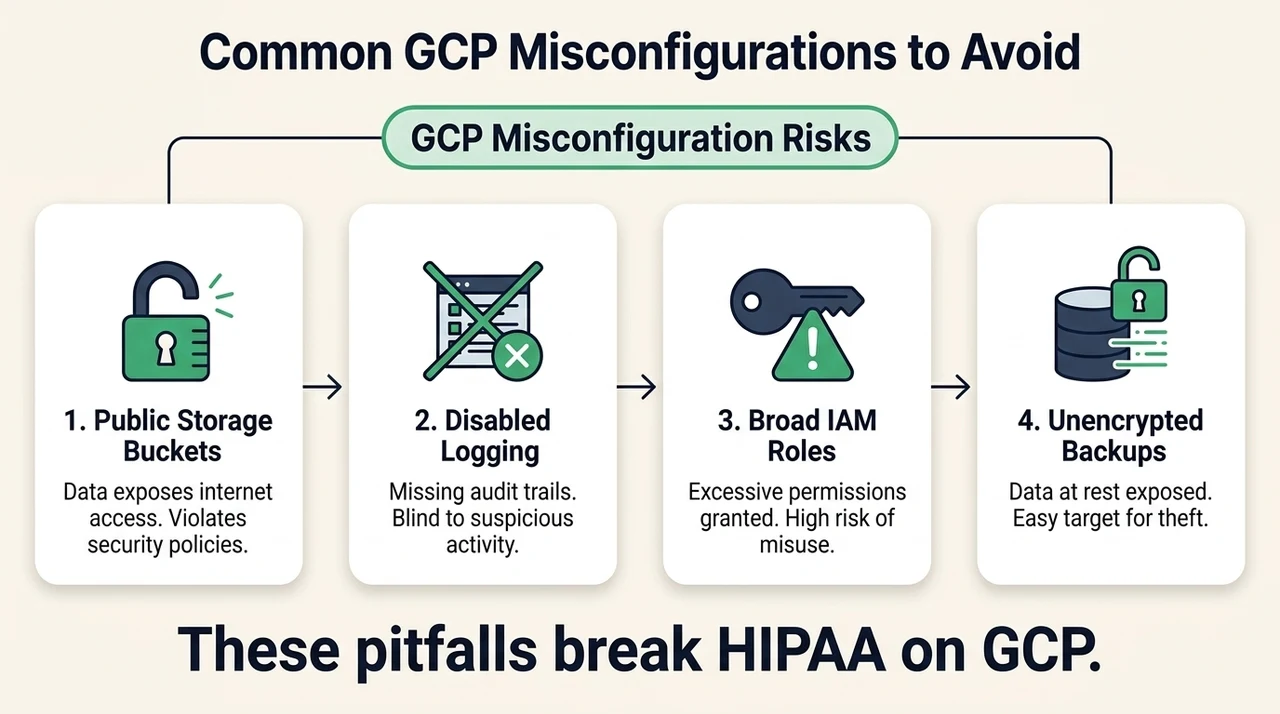
In our delivery work supporting more than 6,000 security audits, with 25 years of combined technical expertise, we see teams struggle with the same operational failures. Security that reads well but fails under incident pressure is a liability. Here are the common pitfalls that break HIPAA cloud compliance on GCP.
- Public storage buckets. Misconfigured IAM permissions on Cloud Storage often leave ePHI exposed to the public internet. Teams accidentally grant allUsers or allAuthenticatedUsers read access while trying to fix an application error.
- Disabled logging. To save money, teams disable Data Access logs or fail to configure long-term retention sinks. When an incident occurs, the observation window is blank, and it becomes impossible to determine the scope of the breach.
- Broad IAM roles. Granting developer teams roles/editor across production violates the principle of least privilege. That broad access lets any compromised developer workstation alter or exfiltrate production database contents.
- Unencrypted backups. Primary databases might use proper customer-managed cryptographic configurations, but teams often export backups to standard storage buckets without applying the same strict cryptographic controls.
Practical Templates You Can Use
To accelerate your implementation, use these structured templates for your security program.
BAA Checklist
Before storing ePHI, verify the following items:
- The Organization Administrator account is secured with hardware MFA.
- The Google Cloud BAA is officially signed and stored in the compliance repository.
- The architecture diagram includes only BAA-covered services.
- Organization policies are active to restrict non-covered service deployment.
- Your vendor risk management system lists Google Cloud as an approved business associate.
Risk Assessment Template
Use this structure to document threats and mitigations:
- Threat: Compromised developer credentials.
- Vulnerability: Lack of MFA on service accounts; excessive permissions.
- Impact: High (unauthorized ePHI access, data exfiltration).
- Likelihood: Medium.
- Mitigation: Enforce MFA, issue short-lived credentials via Workload Identity, and enforce custom IAM roles with least privilege.
- Residual Risk: Low.
IAM Policy Blueprint
Below is an example JSON snippet for a least-privilege role that lets an application read specific objects in a storage bucket, rather than holding full administrative control.
{
  "title": "ePHI Bucket Viewer",
  "description": "Read-only access to specific ePHI storage resources",
  "includedPermissions": [
    "storage.objects.get",
    "storage.objects.list"
  ],
  "stage": "GA"
}
Cryptographic Configuration Checklist
Verify your Cloud KMS setup with these steps:
- The Cloud KMS API is enabled in a dedicated security project.
- Cryptographic key rings are created in the exact geographic region where the data resides.
- Automated rotation is set to 90 days.
- IAM permissions for KMS management are restricted to the core security team.
- Application service accounts are granted roles/cloudkms.cryptoKeyEncrypterDecrypter only.
Audit Logging and Retention Plan
Document your logging architecture:
- Log source: Cloud Audit Logs (Admin Activity, Data Access, System Event, Policy Denied).
- Routing destination: BigQuery dataset for analysis and Cloud Storage Archive for retention.
- Retention period: Six years.
- Access control: Only compliance officers and lead security engineers hold read access to the BigQuery log dataset.
- Integrity: Object locks are enabled on the Cloud Storage destination to prevent log alteration.
Best Practices for Continued Compliance
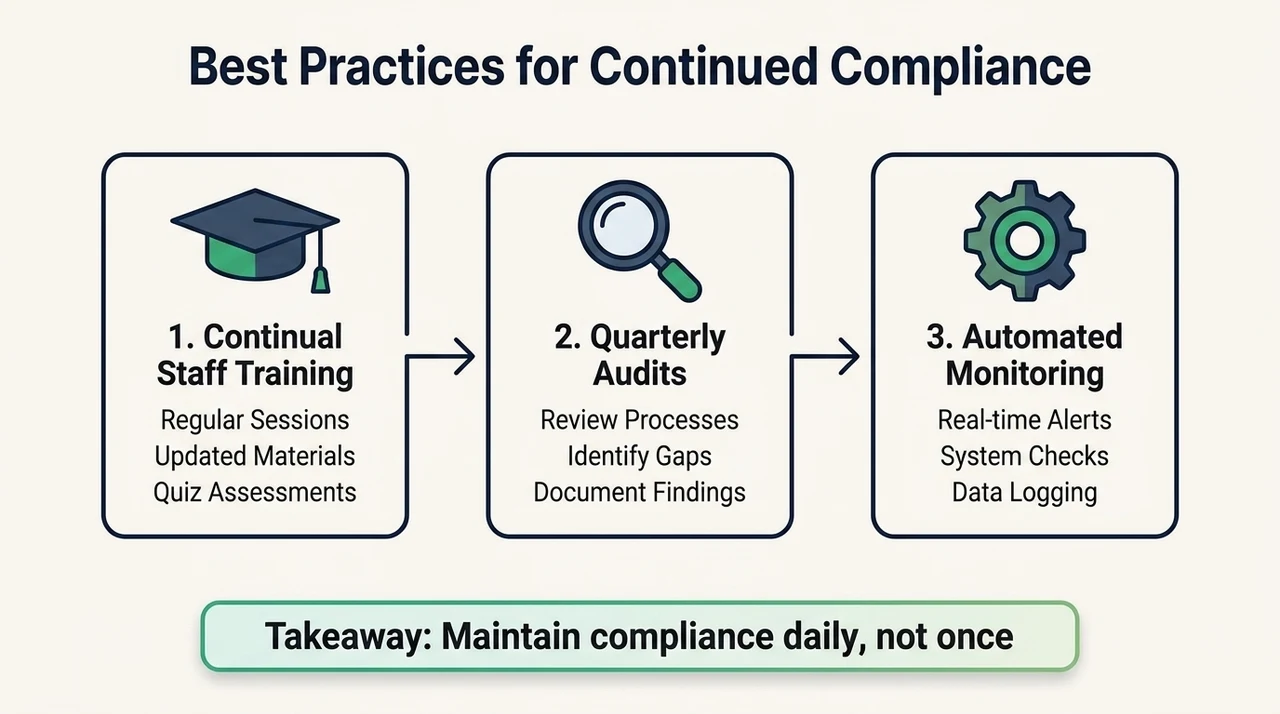
Reaching a secure state is only the first step. Maintaining HIPAA cloud compliance on GCP takes continuous effort, and stale evidence during observation windows is a primary reason organizations fail their assessments.
Continual Training for Staff
Human error remains a primary risk factor. Technical controls will not stop a staff member from falling for a targeted phishing campaign. Run continuous training focused on patient privacy and the handling of ePHI in cloud environments. Track completion rates and use them as evidence during your annual assessments.
Frequent Audits and Configuration Assessments
Do not wait for an external auditor to find your misconfigurations. Schedule internal audits every quarter. Review firewall rules, conduct access reviews for all production environments, and confirm that cryptographic rotation schedules are working. Cross-framework reuse pays off here: the controls you verify for ePHI protection map directly to SOC 2 and ISO 27001 requirements.
Automating Compliance Monitoring
Manual evidence collection is unsustainable. By automating evidence collection, we drop the internal effort to under 70 hours a year, down from the 550 to 600 hours required by standard software tooling. Use infrastructure as code (Terraform) to deploy resources so every environment matches your secure baseline, and run tools that continuously scan your GCP organization for compliance drift and open remediation tickets automatically when a resource falls out of bounds.
FAQ
No. Google provides secure infrastructure capable of handling ePHI, but achieving HIPAA cloud compliance on GCP requires the customer to correctly configure access controls, encryption, and logging. Compliance is a shared responsibility.
A Business Associate Agreement is a required legal contract. It confirms Google's responsibilities for protecting ePHI stored on its servers. You must sign it before uploading any patient data to the cloud.
No. Use only services explicitly listed on Google's HIPAA-eligible covered services list. Using unsupported services for ePHI processing violates federal regulations.
Federal audit expectations generally require organizations to retain security and access logs for up to six years. Configure automated routing to long-term, cost-effective storage such as BigQuery or Cloud Storage Coldline to meet this requirement.
Yes. Technical controls are only one part of the equation. Administrative safeguards, including official risk assessments, incident response plans, and mandatory workforce privacy training, are strictly required by the regulation.
Configuration errors lead to real-world data breaches. You face severe regulatory fines, mandatory public breach notifications, loss of enterprise contracts, and intense scrutiny from federal auditors. Building durable controls prevents these outcomes.
See your real GCP HIPAA gap, not a guess
Book a demo and we'll map your GCP environment against the Security Rule's technical safeguards, self-serve or with our CISO-led team running it for you.
Book a demo
Conclusion
Procurement questionnaires, BAAs, and security addenda dictate the speed of enterprise sales. When buyers demand proof of operational security, paper policies will not suffice. You must demonstrate control implementation, continuous monitoring, and structured vulnerability management.
The true measure of HIPAA cloud compliance on GCP is how your systems behave under pressure. Start with security and arrive at compliance. By using GCP's native security tools, enforcing strict access boundaries, and maintaining immutable audit trails, you protect patient data while accelerating your business objectives. Build the program once, operate it daily, and let compliance follow as a natural result of strong engineering.